


Copy link to clipboard
Copied
Hello,
I have beat my head on this for 2 days now. The Encore CS6 library (template) files seem nowhere to be found anywhere on Adobe's or on the web period. Is there anyone who could help me with this. Perhaps someone has a functioning Encore CS6 with Library and could possibly share the files somehow. Adobe support has been useless. They will give me links to download the Encore CS6 software but not the Library files to go with the software....seems really dumb. The website has support pages concerning this topic but all the links for the supposed fix are all broken.
Thanks in advance for your help.
Best,
Todd


 1 Correct answer


Yes, I can confirm that most of the pages that might be useful for getting the Encore library are not working. But this one started a download, so try it:
https://download.macromedia.com/pub/developer/encore/EncoreContent_en-US.zip
It is the full Encore library, download size 2.67GB, so it may take some time. It will uncompress to 3.67GB.
These files have never required use of a serial number, so they are in a bit of a no man's land in the age of downloads having changed.
The first file
...
 75
Replies
75
75
Replies
75


Copy link to clipboard
Copied
Looking on my backup drive from when I first bought PProCS6 via download...
PremierePro_6_Content_LS7.7z is 750Meg The EXE installer is only 1Meg
Encore 6.02 file update EncoreTrial-6.0.2-mul-AdobeUpdate.zip is 125Meg
Far too large to send via email... you're going to have to go back to support and ask for the links... as far as I can remember, I did nothing to change the file names when downloading, so having the names may help you get to a support person who knows something
Copy link to clipboard
Copied
Yes, I can confirm that most of the pages that might be useful for getting the Encore library are not working. But this one started a download, so try it:
https://download.macromedia.com/pub/developer/encore/EncoreContent_en-US.zip
It is the full Encore library, download size 2.67GB, so it may take some time. It will uncompress to 3.67GB.
These files have never required use of a serial number, so they are in a bit of a no man's land in the age of downloads having changed.
The first file John lists - PremierePro_6_Content_LS7.7z - is a content file, but it contains only a few Encore full templates: no separate buttons, backgrounds etc.
The primary download for the file you want - the full Encore library - was 1.67 GB. It uncompresses from a zip to a 7z and to a final size of 3.69 GB.
Copy link to clipboard
Copied
Interesting... and I wonder why a Macromedia page has an Encore file
Anyway, good that you found a link to help

Copy link to clipboard
Copied

Copy link to clipboard
Copied
Thank you Stan for this link.
I was able to download the file just fine, however I can't seem to locate the setup.exe file.
Any ideas as to why that is?
Thx in advance.
Copy link to clipboard
Copied
There is no setup file for this full version of the Encore library. You unzip it and move the contents to the location shown in the Encore preferences. (Or you can change the location there.)
Stan

Copy link to clipboard
Copied
Mr stan i too have the same issue... I downloaded the encoder_zip.. After that i dont know what to do?.. Please Please reply to me and guide me..
Thanks in advance 🙂

Copy link to clipboard
Copied
When you download the file encore_zip. Seperate each folder
"Library"
"main"
"Styles"
"support"
"Template"
"en-US"
then select all those folders control and X, to cut and paste it in C:\Program Files\Adobe\Adobe Encore CS6. Once you paste it just close the folder and run your adobe encore program then you'll see all the menus and etc on encore.

Copy link to clipboard
Copied
My problem is ... I see the menu but when wanna start using it when I click on any main menu template encore said "file not found"
what am I doing wrong?
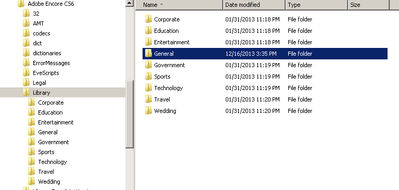
all menu folders are in LIBRARY folder of encore folder
Copy link to clipboard
Copied
Defaultw5, whatyou describe sounds like it should work. If you are seeing the Libary "sets" (General, Corporate, etc) and there are menus in there, screenshots from you would help.
Make sure your preferences are set so Encore is looking in the right directory:


The file structure with "Library" as a subfolder of "Encore."
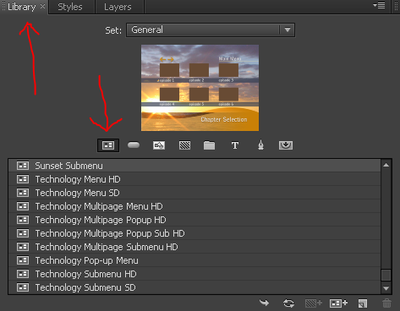
The Library panel, with the General set selected and showing only menus, should look like this:
Stan

Copy link to clipboard
Copied
Hello Stan, (and or any others feeling helful)
Hope you are weathering the present crisis. Like others, I am working from home (lots of experience with that), and have returned to DVD authoring. Further to that, I went to the library for menus, and all are gone....
I have the 7z files on my desktop (I am on laptop, as my wife is working from home now as well and is monopolizing the DT). I went to preferences and attempted to link the Content Files, but there is no Library subfolder that I can see. Anyway, hopefully you see this plea for help and reply - I will furnish all the info needed to get this done.

Copy link to clipboard
Copied
Hello icmicmicm,
I downloaded these Encore files just now using the link shown in Stan's post of 16 May 2019. I have the CS6 DVDs from about 2012, my Encore is version 6.0.2.004. I was looking for additional menus as I was using a tutorial from the CS6 Premiere Pro Classroom in a Book, and it mentioned the "Radiant Menu Wide" which was not in my menu list. After doing some searching around, I found this forum and thread.
I can see in the uncompressed downloaded directory, "EncoreContent_en-US" there is a subdirectory en-US, and in that directory I see a Library directory with 9 subdirectories, each with much more content than my installed Library directory. For example, in my installed library, the General directory has only 14 files, while the General directory in this uncompressed download has 310 files. And I can see the "NTSC Radiant Menu WIDE"and others in these downloaded Library files.
My solution was to rename the small 2012 Encore Library as Library_Original, and copy this new Library directory with its much more content to the same location, C:\Program Files\Adobe\Adobe Encore CS6\
As Stan mentions, this is a large directory, 3.67 GB, and when opening Encore with this new library, it takes a little extra time to scan it.
Copy link to clipboard
Copied
ICMICMICM,
Thanks for the efforts folks. THe link worked, but I also located the downloads on one of the drives of my mainframe - so it is there forever. Don't know how I could get it to anyone who needs it, maybe Google Drive. Be well,
Ian

Copy link to clipboard
Copied
Hey Ian,
I'm a week behind you, but the link redirects me to a forum homepage for Adobe products, with no way of downloading the content. Would you be open to sharing that file via Google Drive or Mega? Anything?
Copy link to clipboard
Copied
Kisile,
The link will work if you simply copy the link from Stan's post of 15May2019, (.../download.macromedia. ......zip), and paste it into your browser URL line. The link doesn't work with just a double click.
I was successful just now by doing the link pasting into Firefox URL, and also verified non functionality if you double click.
Copy link to clipboard
Copied
(I really dislike the new nesting in the forum threads! lol.)
Here is my post from 4/13/20.
https://community.adobe.com/t5/premiere-pro/encore-cs6-library-files-missing/m-p/11045369#M262822
I repasted the link, and it works with a click. The forum modified some of the old links.
The good news is the download still works!
Stan

Copy link to clipboard
Copied
Please I have done as you suggested but unfortunately my premier pro 2014 and 2017 still cant see the templets. what do i need to do more

Copy link to clipboard
Copied
These templates are for Encore not Premiere.
Copy link to clipboard
Copied
The Library is for Encore CS6; it cannot be used in Premiere Pro.
Stan

Copy link to clipboard
Copied
Where should I save this folder in the photoshop folder ? thanks in adv
Copy link to clipboard
Copied
You save it in the Encore folder. See the second screenshot in my post above:
https://community.adobe.com/t5/premiere-pro/encore-cs6-library-files-missing/m-p/11823462#M328950
The Encore folder is in the Progrom Files. (The screenshots are from Windows.)
Stan

Copy link to clipboard
Copied
Hi, I tried the link that is given to download the files. But no files were downloaded. Can you help me with this. The screenshot of the page that i landed is attached
Thanks in advance for your help.
Regards,
Madhusoodanan
Copy link to clipboard
Copied
Thank you so much Stan and John. The link Stan provided worked beautifully! Don't know why it is so hard for Adobe to keep the links active to these files. Again, Thanks!!!!!!!!!!
Copy link to clipboard
Copied
You're welcome! Let's hope this link stays active.


 AdChoices
