
Learn how you can download and install Photoshop Elements on Windows and macOS.
With Photoshop Elements, you can create magic with your photos. You can have more than one version of Photoshop Elements installed on your computer. So, there’s no need to uninstall earlier versions.
Before you begin
- Make sure that you have administrative privileges for the account you are using.
- Use the latest version of Internet Explorer, Firefox, Chrome, or Safari.
- Make sure that you have a valid Adobe ID.
- Disable pop-up blockers in your web browser.
- Temporarily disable firewalls, antivirus software, and third-party security software. Disabling them speeds up the installation process.
- Make sure that you are connected to the Internet until the installation is complete.
Download Photoshop Elements
-
Open the Adobe Photoshop Elements download page in your web browser.
-
Sign in with your Adobe ID. If you don't have an Adobe ID, you can create an Adobe ID.
-
Select Download.
Install Photoshop Elements
-
Open the Adobe Photoshop Elements installer file that you downloaded from the Adobe website.
-
Sign in with your Adobe ID (usually your email) and password.
-
Select Continue on the next screen that appears.
-
On the Installation Options screen, do the following and select Continue:
- Select language
- Specify installation location
Configure the installation options. Configure the installation options. -
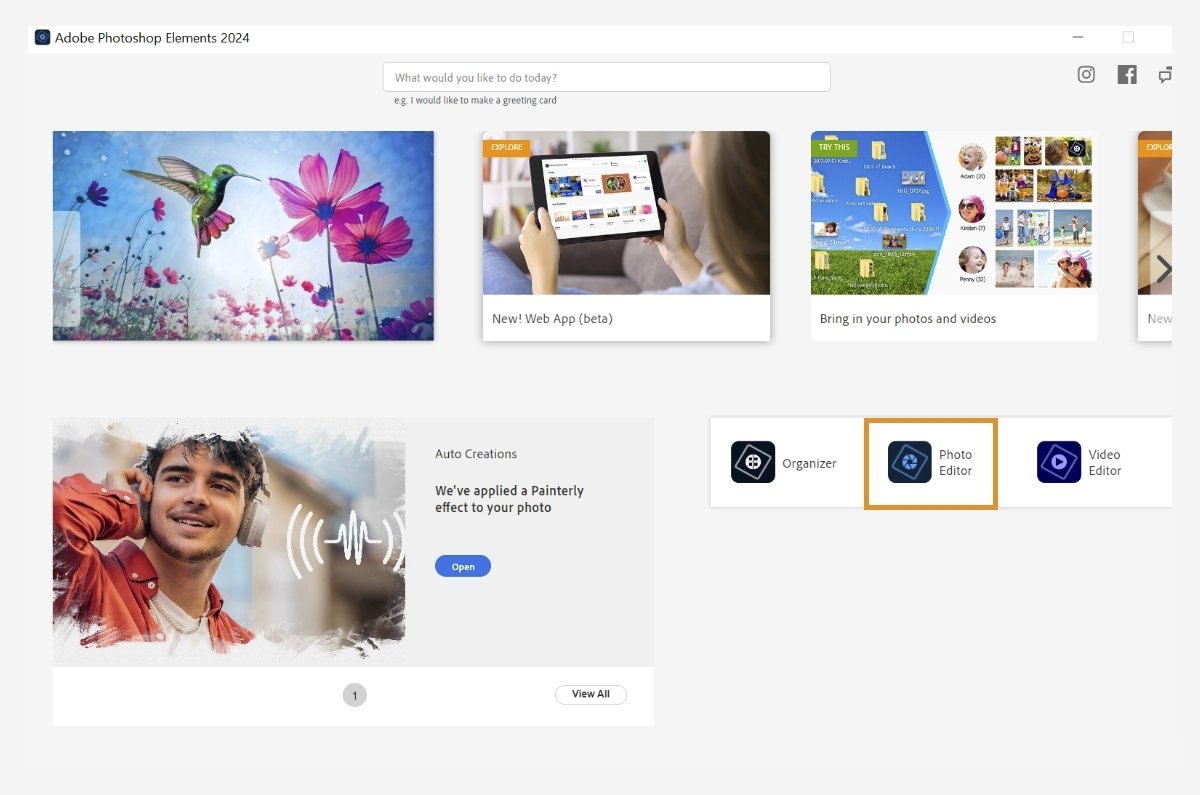
In the screen that appears, select Photo Editor.
Select Photo Editor to launch Adobe Photoshop Elements 2026. Select Photo Editor to launch Adobe Photoshop Elements 2026. -
Sign in using your Adobe ID, if prompted.


You can convert to the full version anytime. Follow the given steps:
-
If no valid license is found with your Adobe ID, you get a 7-day free trial. You can purchase a license on Adobe.com during or after the trial. You can also sign out and use an Adobe ID with a valid license.
The screen shows the number of free trial days left for Photoshop Elements 2026. The screen shows the number of free trial days left for Photoshop Elements 2026. -
After converting to the full version, you'll see the pop-up screen given and select Get Started. Then, you can successfully launch and use Adobe Photoshop Elements 2026.
-
You can confirm the conversion status by navigating to Help > System Info and checking for License Type: Paid.
Check the license status as Paid. Check the license status as Paid. Note- Can't find your redemption code? See Help with redemption codes to know more.
- Received a redemption code? Use your redemption code to get started.
- Can't find your redemption code? See Help with redemption codes to know more.


Activate using Serial Number
Appliable for 2024 and earlier versions.
After downloading and installing Photoshop Elements 2024 and earlier versions, you can activate the full version using the serial number. Follow the given steps to activate:
-
In the Home screen, select Photo Editor.
Select Photo Editor to launch Adobe Photoshop Elements. Select Photo Editor to launch Adobe Photoshop Elements. -
Sign in using your email address and password.
Sign in using your Adobe ID. Sign in using your Adobe ID. -
Select Activate now on the Welcome screen.
Welcome screen for Photoshop Elements 2025. Welcome screen for Photoshop Elements 2025. -
Enter the serial number in the next screen and select Next.
Enter the serial number. Enter the serial number. Adobe Photoshop Elements launches successfully.
Note- Can't find your serial number? See Find the serial number of your Elements product to know more.
- Received a redemption code? Use your redemption code to get your serial number. See Help with redemption codes to know more.


Before you begin
- Make sure that you have administrative privileges for the account you are using.
- Use the latest version of Internet Explorer, Firefox, Chrome, or Safari.
- Ensure that you have a DVD drive (not CD drive) connected to your computer before you begin installation. Insert the DVD into the drive and follow the instructions.
Note: If your computer does not have a DVD drive, you can download Photoshop Elements from Adobe website and then install it. For more information, see Download and install from Adobe website.
- Temporarily disable firewalls, antivirus software, and third-party security software. Disabling them speeds up the installation process.
- Locate the serial number. The serial number is located at the bottom of the DVD sleeve. For more information on finding the serial number, see Find the serial number of your Elements products. If you have a redemption code, convert the redemption code to a serial number. For more information, see Help with redemption codes.
Install Photoshop Elements
-
Insert the Adobe Photoshop Elements 2022 DVD in your computer.
-
In the Adobe Photoshop Elements 2022 dialog box, select Install Adobe Photoshop Elements 2022.
Note:
If you close the dialog box or if the security settings on your computer do not permit AutoPlay, browse to the DVD using Windows Explorer and double-click Setup.exe from the Adobe Photoshop Elements 2022 folder. If any security warnings appear, select Yes.
-
Do one of the following:
- macOS: Navigate to Adobe Photoshop Elements 2022 > Install.app and launch the installer. Enter your system's password if prompted.
- Windows: (Optional) If you close the dialog box or if the security settings on your computer do not permit AutoPlay, browse to the DVD using Windows Explorer and double-click Setup.exe from the Adobe Photoshop Elements 2022 folder. If any security warnings appear, select Yes.
-
Sign in with your Adobe ID (usually your email) and password.
-
Select Continue on the next screen that appears.
-
On the Installation Options screen, do the following and select Continue:
- Select language
- Specify installation location
Configure the installation options. Configure the installation options. -
In the screen that appears, select Photo Editor.
Select Photo Editor to launch Adobe Photoshop Elements 2022. Select Photo Editor to launch Adobe Photoshop Elements 2022. -
Sign in using your Adobe ID and password.
Sign in using your Adobe ID Sign in using your Adobe ID -
Select Activate now on the Welcome screen.
Welcome screen. Welcome screen. -
Enter the serial number in the next screen and select Next.
Enter the serial number. Enter the serial number. Adobe Photoshop Elements 2022 launches successfully.
Note- Can't find your serial number? Refer to Find the serial number of your Elements product to know more.
- Received a redemption code? Use your redemption code to get your serial number. View Help with redemption codes to know more.


