
If you were contacted by Adobe or by your reseller regarding migration in July, your migration is on an accelerated timeline of 33 days (versus the 53 days as stated in this document). Please refer to the migration page within your Acrobat Sign application for the exact timeframe for your organization's migration.
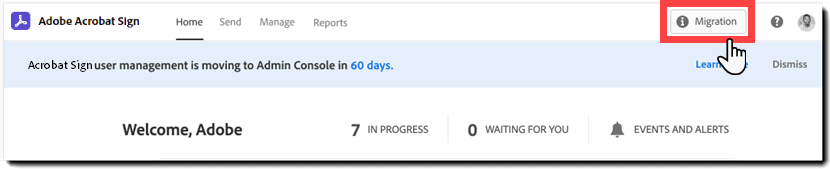
Adobe is enhancing the way you manage your Adobe Acrobat Sign users and licenses, bringing increased productivity to you and your organization. As part of this change, Adobe is migrating your Acrobat Sign subscription to the Adobe Admin Console.
This is a required migration and will not affect any workflow, content, or assets within your Acrobat Sign account.
Admins will be able to manage users and licenses using an experience that is consistent with other Adobe products
Customers with Azure Active Directory or Google Federation will be able to directly integrate their service with the Admin Console
Your account will become part of the Adobe Value Incentive Plan (VIP)
The migration of the Acrobat Sign subscription includes:
- Migration of the Acrobat Sign account management & billing to the Adobe Value Incentive Plan (VIP)
- Migration of the Acrobat Sign account user & licensing to the Adobe Admin Console
After the migration, your Acrobat Sign account management and billing will become part of the Adobe Value Incentive Plan (VIP) in accordance with the terms of your agreement with Adobe.
What is VIP?
The Adobe Value Incentive Plan (VIP) is a subscription licensing program with simple management capabilities that give you lots of choices, and discount levels that increase as you make additional purchases.
Learn more at https://helpx.adobe.com/enterprise/vip.html
What is VIP Membership ID?
As part of your migration to the Value Incentive Plan (VIP), you will be issued a VIP ID.
The VIP ID is a unique identifying number that designates your organization as a member of the VIP program. All communications and account management actions going forward will reference this number.
Further details about how you will manage your account billing, invoicing, taxes, and ordering changes can be found on the Migration of Acrobat Sign account management & billing to Adobe Value Incentive Plan (VIP) page.
The following section provides a summary of the process to migrate your users and license management to the Adobe Admin Console.
Further details can be found in Migration of Acrobat Sign user & licensing to the Adobe Admin Console.
What is changing about the user and license management for Acrobat Sign?
As part of the migration, your user and license management will move from within the Acrobat Sign application to the Adobe Admin Console user and license management experience.
Going forward, you will manage your users and their access to the Acrobat Sign application only within the Admin Console. You will continue to manage all the other functionality within the Acrobat Sign application itself, including management of Acrobat Sign features, functionality, and behavior.
See here for additional information on managing Acrobat Sign in the Admin Console.
Timeline for User and License Migration:
All communications and tools below are only viewable and available to Acrobat Sign account admins unless explicitly stated in the bullet description.
53 days prior
- Overview email introduces the migration process
- Banner within Acrobat Sign links to the new Acrobat Sign migration page
45 days prior
- Get Started email directs admin to Acrobat Sign migration choices
- Acrobat Sign migration page provides migration choices
30 days prior
- Invitation email to Adobe Admin Consol
- Access to Adobe Admin Console enabled
- Acrobat Sign migration page provides a summary of the migration status and next steps
1 day prior
- Migration reminder email sent
Migration day
- Migration completion email sent
- Acrobat Sign users receive an email detailing the new sign-in process.
Before the migration day
Users are not part of the pre-migration experience and are not impacted in any way.
On the migration day
On the day of the migration, Acrobat Sign users are emailed instructions on how to sign in to Acrobat Sign with an Adobe ID.
Users that are online when the account is migrated will NOT be disrupted. Their existing session to the Acrobat Sign service will be viable until they log out or the session expires due to inactivity.
When the user has to re-authenticate, they will be routed through the new sign-in process.
Admins can contact the support team for any questions
