
Open the Manage page.
Last updated on
Feb 17, 2026
Alert
This article contains prerelease information. Release dates, features, and other information are subject to change without notice.
Use Create a copy to resend an agreement by starting from an existing one and updating only what’s needed.
Create a copy is useful when you regularly send similar agreements and want to avoid rebuilding them from scratch, or when an agreement needs to be resent or reused. You can copy an agreement, review the prefilled details, make any required changes, and resend it in less time. Agreements in any status can be copied.
Availability
The Create a copy action is available to enterprise-tier accounts as a core feature of the Acrobat Sign service.
Before you begin
To use Create a copy:
- The agreement must have been sent using the modern Request Signature experience.
- You must be the original sender of the agreement.
How to create a copy of an agreement
-
-
Locate an agreement you sent.
-
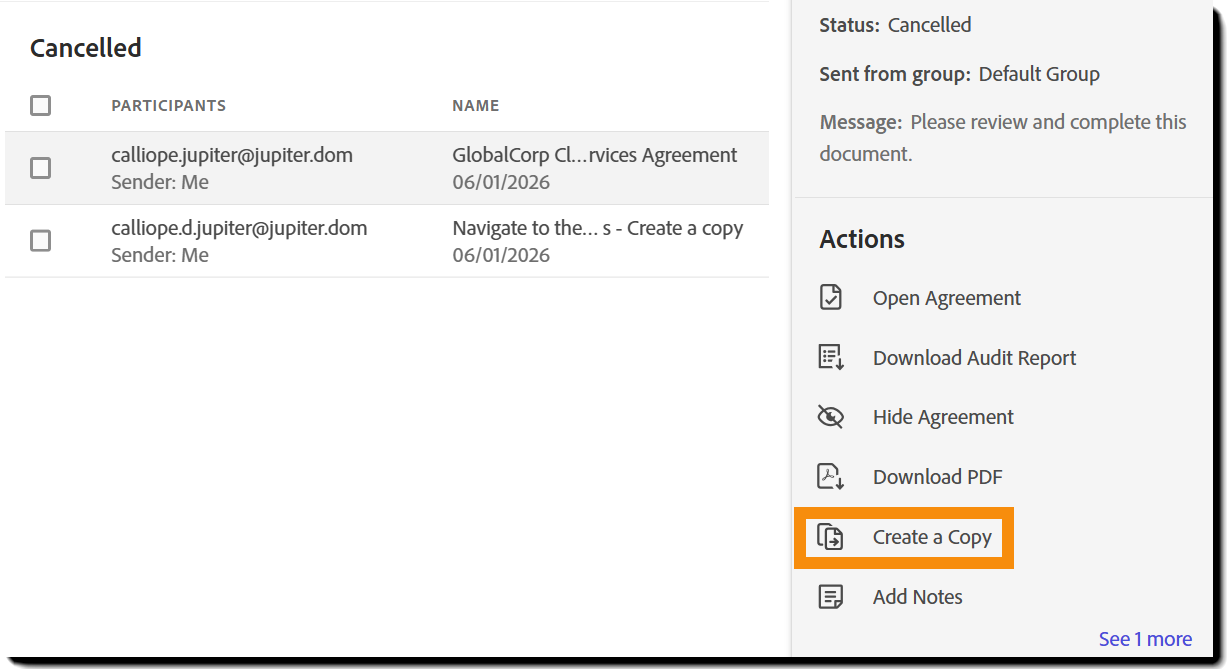
Select the agreement to open its actions panel.
-
Select the Create a Copy action.
-
Review the prefilled agreement on the Send page.
The agreement is in a Draft state at this point. -
Make any required changes.
-
Send the agreement.
Post-send confirmation page entry point
You can also create a copy immediately after sending an agreement by selecting Create a copy from the post-send confirmation page.

What’s copied into the new agreement
When you create a copy, Acrobat Sign carries over the original agreement’s setup, including:
- Agreement name and message
- Uploaded files and file order
- Recipients, roles, and routing order
- Recipient delivery methods and authentication settings
- CC recipients
- Agreement settings such as reminders, expiration, and language
- All form fields, including placement and assignments
- Group selection when Users in Multiple Groups is enabled
What you can change before sending
Before sending the copied agreement, you can:
- Replace, add, remove, or reorder files
- Edit the agreement name and message
- Add, remove, or update recipients and CCs
- Change recipient authentication or delivery options
- Update agreement settings
- Edit or add form fields in authoring
- Change the sending group, if applicable
The copied agreement is fully editable until you send it.
API access
Developers can use the Create a copy feature through the POST /agreements/{agreementId}/copy endpoint.
Known limitations
Create a copy has the following limitations:
- Agreements sent through web forms, Send in Bulk, Fill and Sign, or custom workflows can’t be copied.
- Agreements that include witness participants can’t be copied.
- If the original agreement has been deleted due to document retention or GDPR deletion, it can’t be copied.
- Copying isn’t supported if the sender no longer has access to a required library template.
- If the source agreement used password authentication, authentication must be reset and reconfigured on the copied agreement.
