Use modern authoring to prepare agreements and library templates with form fields that collect signatures, information, and other recipient input.
The modern Adobe Acrobat Sign authoring experience brings field placement, recipient assignment, field configuration, and document review into one workspace. Start here to understand the authoring model, then use the linked task and reference pages for the work you need to complete.
Where modern authoring is used
Modern authoring is available when you:
- Prepare an agreement with Request Signatures.
- Add or edit fields on a library template.
Web Forms and Send in Bulk continue to use classic authoring. Modern authoring isn't available in Acrobat Sign for Government.
Get familiar with the authoring workspace
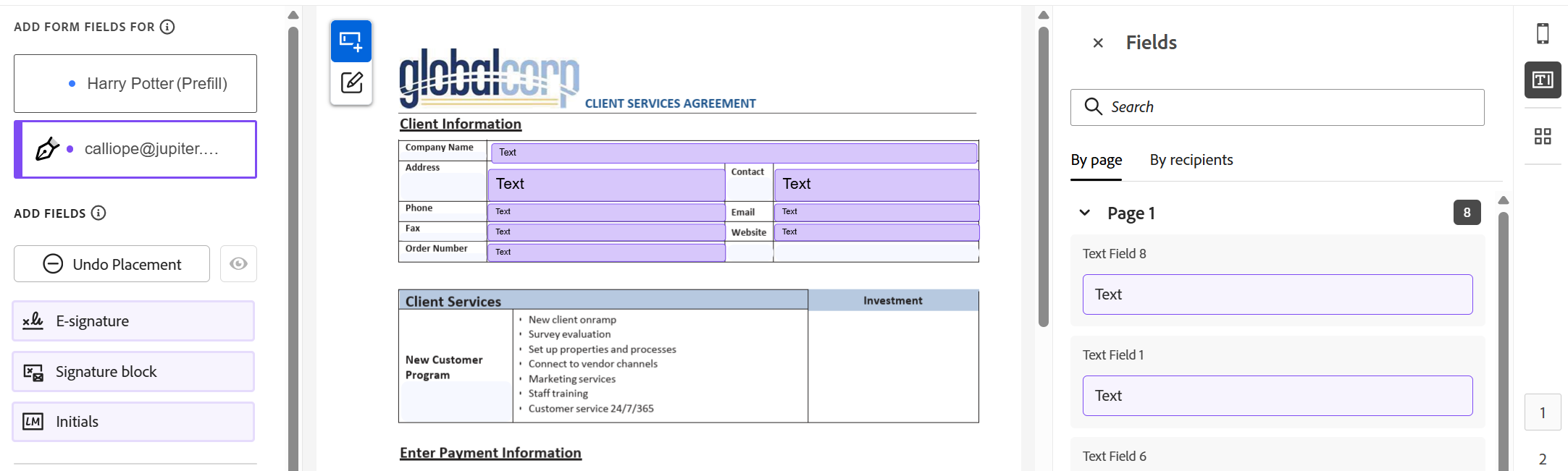
The authoring workspace combines the document with the tools you need to prepare its form fields.
The main parts of the workspace let you:
- Work directly with fields on the document.
- Select the recipient associated with fields you place or edit.
- Customize the properties of a selected field.
- Use the Fields panel to review fields already placed throughout the document.
Choose how to add fields
The document you open in authoring determines how you may begin working with fields.
Use suggested fields
Acrobat Sign can identify likely locations for form fields and display them as suggestions. Suggested fields are placeholders until you choose to place them, giving you control over which detected fields become part of the agreement.
See Work with suggested fields.
Add fields yourself
You can place fields directly on the document and configure their recipient, name, requirements, and other supported properties.
See Add and configure form fields.
Work with fields already in a PDF
A PDF can contain form fields before it is uploaded to Acrobat Sign. When those fields require recipient assignments, authoring provides a workflow for assigning them before you continue preparing the agreement.
Review and manage placed fields
As the form grows, you may need to locate fields, review recipient assignments, manage several fields together, or reuse an existing field configuration.
Use:
- Review and manage form fields to find, select, reassign, and manage fields across the document.
- Copy, clone, and link form fields when you need additional fields with the same or related configuration.
Prepare specialized authoring workflows
Some agreements require additional preparation beyond ordinary field placement.
- Use Prefill fields when the sender needs to enter information before the agreement reaches the first recipient.
- Apply field templates to add a reusable field layout to an agreement or reuse an existing field layer on an updated library template.
Configure field behavior
Use these pages when fields need behavior beyond basic placement and assignment:
- Validate form fields to control the format of information recipients can enter.
- Set conditions on form fields to show, hide, enable, or disable fields based on other field values.
- Create and configure checkbox groups to define selection requirements across related checkboxes.
- Create a calculated field to derive a field value from other information in the form.
- Calculated field formulas and functions for calculation syntax, operators, functions, and field references.
- Use identity-verified data in form fields when fields need to use information from a verified identity.
Find field and configuration information
Use the reference pages when you need to choose a field or determine which capabilities it supports:
- Form field types describes the available fields and when to use them.
- Form field properties identifies the properties and behaviors available to different field types.

Streamline your work with Acrobat Sign
Manage and sign documents online quickly and easily.
