
- Adobe Lightroom 用户指南
- 简介
- 应用程序内学习
- 添加、导入和拍摄照片
- 整理照片
- 编辑照片
- 编辑照片
- 在移动版 Lightroom (iOS) 中编辑照片
- 在移动版 Lightroom (Android) 中编辑照片
- 在移动版 Lightroom (iOS) 中使用“快速操作”编辑照片
- 在移动版 Lightroom (Android) 中使用“快速操作”编辑照片
- Lightroom 中的预设
- 移动版 Lightroom (iOS) 中的预设
- 移动版 Lightroom (Android) 中的预设
- Lightroom 中的裁剪、旋转和几何工具
- 在移动版 Lightroom (iOS) 中裁切图像
- 在移动版 Lightroom (Android) 中裁切图像
- Lightroom 中的移除工具
- 使用仿制工具移除
- 使用修复工具移除
- 移除不需要的人物
- 移除窗户反射
- 移除照片中的传感器灰尘
- 移动版 Lightroom (iOS) 中的移除工具
- 移动版 Lightroom (Android) 中的移除工具
- Lightroom 中的编辑面板
- Lightroom 中的蒙版
- 在移动版 Lightroom (iOS) 中应用蒙版
- 在移动版 Lightroom (Android) 中应用蒙版
- Lightroom 中的镜头模糊
- 使用生成式 AI 增强照片
- 合并照片以创建 HDR、全景图和 HDR 全景图
- 编辑 HDR 照片
- 在移动版 Lightroom (iOS) 中编辑 HDR 照片
- 在移动版 Lightroom (Android) 中编辑 HDR 照片
- 在 Lightroom 中轻松提升图像质量
- 在其他应用程序中编辑照片
- 了解 Content Credentials
- 在移动版 Lightroom (iOS) 中添加 Content Credentials
- 在移动版 Lightroom (Android) 中添加 Content Credentials
- 管理使用 AI 驱动的工具所做的编辑 (iOS)
- 管理使用 AI 驱动的工具所做的编辑 (Android)
- 从图像生成视频
- 编辑照片
- 编辑视频
- 存储、共享和导出
- Lightroom 移动设备版、TV 版和 Web 版
- Lightroom for mobile (iOS) 入门
- Lightroom for mobile (Android) 入门
- Adobe Photoshop Lightroom Web 版
- 设置 Lightroom for Apple TV 应用程序
- 在 Lightroom for mobile(iOS 和 Android)中使用键盘快捷键
- Adobe Photoshop Lightroom for mobile 和 Apple TV | 常见问题解答
- 在 TV 上查看 Lightroom 照片和视频
- 如何在移动设备中添加/同步预设
- 管理移动版 Adobe Lightroom 订阅 (iOS)
- 管理移动版 Adobe Lightroom 订阅 (Android)
- 迁移照片
- 疑难解答
了解 Lightroom 桌面版和移动版最新版本中的新增功能。
Lightroom 中的主要新功能
2023 年 10 月版 Adobe Lightroom - 桌面版(版本 7.0)、iOS 版(版本 9.0)和 Android 版(版本 9.0)
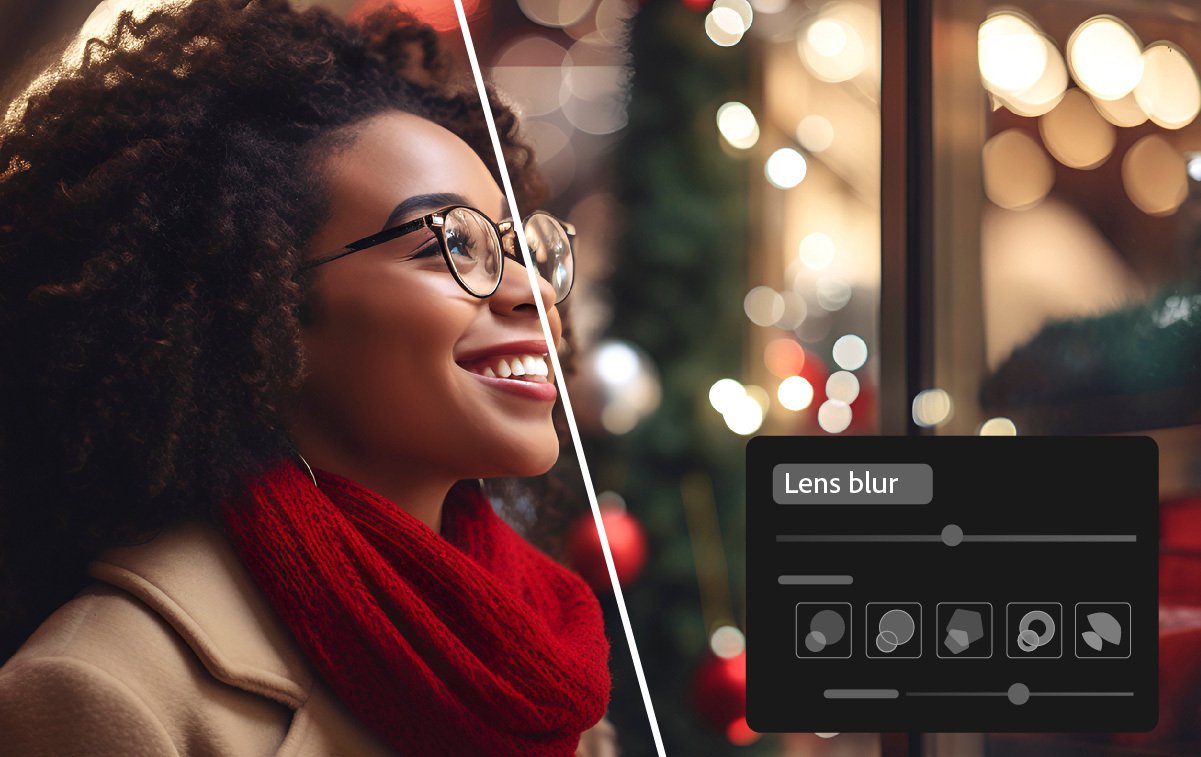
Add blur using the Lens Blur tool (desktop & mobile)
Add an aesthetic blur effect to any part of a photo through AI-powered Lens Blur. Easily achieve the popular Bokeh effect without using an expensive camera lens.

Edit and export HDR photos in Lightroom (desktop & mobile)
Edit and save HDR photos in new industry-standard formats like AVIF and JPEG XL, which offer higher quality at smaller file sizes. You can also capture and edit HDR photos directly on Lightroom for mobile.

Edit locally stored photos in Lightroom (desktop only)
Access, edit, and organize locally stored photos in Lightroom without importing them. Bookmark your favorite folders and selectively copy images to the Lightroom cloud.

New editing experience in Lightroom (mobile only)
Easily edit your photos in Lightroom for mobile with a streamlined and more intuitive editing experience.

Find newly added cameras and lenses in the full list of supported profiles.

Find out about other enhancements in the detailed new features summary.

