
Click the Gear icon in the upper-right corner and click Internet Options.
Last updated on
Dec 22, 2021
|
Also applies to Adobe Connect 8, Adobe Connect 9
How to make Adobe Connect Meeting room open in browsers by enabling Flash in browser or by using the application for desktop.
To launch a meeting in the browser window, install and enable the Flash Player in your browser. If Flash Player is not installed or is disabled, Adobe Connect meeting room does not open in a browser. Instead, it prompts to install the Adobe Connect application.
Adobe Connect in Google Chrome
To attend an Adobe Connect session in Chrome browser, make sure Flash is enabled in Chrome and access the meeting URL. If you have the application for desktop installed, Chrome launches the meeting in the application.
If the meeting is launched in the application from the Chrome browser, then closing all instances of the Chrome browser causes you to exit the room.
Adobe Connect in Mozilla Firefox
Adobe Connect application for desktop does not launch when a meeting is launched from Flash-enabled Firefox 32-bit browser. For first-time users, Adobe Connect application does not get automatically installed when using 64-bit Firefox.
Use any one of the following workarounds:
- Use a different browser.
- Manually install the application for desktop. Launch meeting directly in the application for desktop.
- Disable Flash in Firefox browser and then access the meeting URL.
Adobe Connect in Internet Explorer
As an Adobe Connect 9.7 user, if you cannot load the Adobe Connect Central home page using Internet Explorer 11, switch to a different browser. Alternatively, request your administrator to upgrade to Adobe Connect 9.8.
To install Flash Player in Internet Explorer, see this article.
To use Adobe Connect in IE, enable Flash Player in IE and disable ActiveX Filtering in IE. To do so, see Flash Player in IE.
-
-
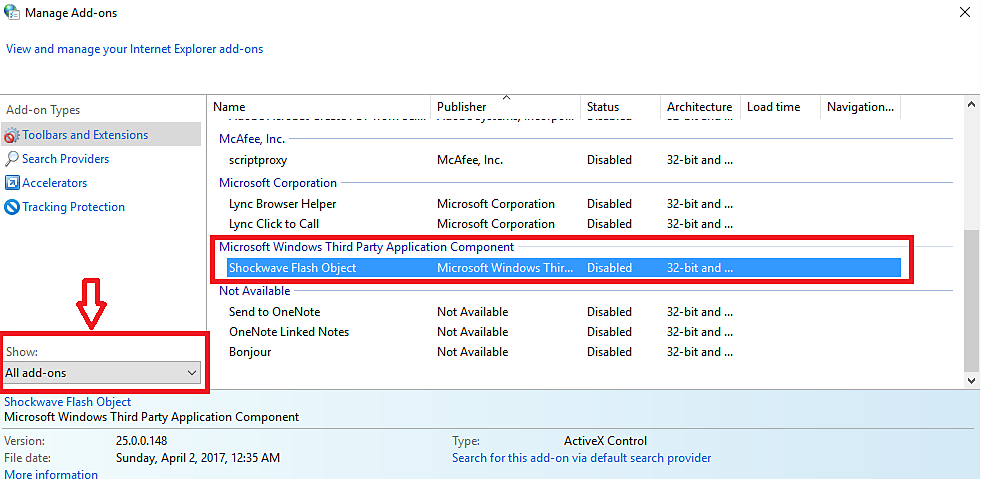
In the Internet Properties, open the Programs tab and select Manage Add-ons. Enable Shockwave Flash Object. If the plug-in is not available, download it from here.
-
Relaunch the browser and the meeting room.
Enable Flash Player in browser
Flash Player in Google Chrome
-
Open chrome://settings/content from the address bar, to access the Chrome Content Settings.
-
In the Content Settings, search for Flash and select Allow sites to run flash.
Alternatively, use the manage exception option to allow Flash for your Adobe Connect domain only.
-
Open Chrome://components. To update the Flash plug-in, click Check For Updates.
-
Relaunch the Chrome browser and the Adobe Connect meeting.

Flash Player in Mozilla Firefox
-
Open about:addons in the browser address bar.
-
On the Plug-ins page, select Always Activate for Shockwave Flash. If the plug-in is not available, download it from here.
-
Relaunch the browser and the meeting room.

Flash Player in Safari
-
Click the Safari menu in the upper-left corner and select Preferences.
-
In the Preferences dialog box, click Security and select Plugin Settings.
-
In the Plugins Settings, activate Flash Player. If the plug-in is not available, download it from here.
-
Relaunch the browser and the meeting room.

Flash Player in Microsoft Edge
-
Open browser settings and click View Advanced Settings.
-
In the Advanced Settings, search for Use Flash Player, and turn it on using the slider. If the plug-in is not available, download it from here.
-
Relaunch the browser and the meeting room.

If the Adobe Connect meeting still does not open in the browser, append ?launcher=false at the end of the meeting URL. For example, if your meeting URL is "meetingroom.example.com", then open "meetingroom.example.com/?launcher=false".
If the issue continues to persist, contact the Adobe Connect Support team here.
