للحصول على نصائح الخبراء وحلول المشكلات الشائعة، قم بزيارة منتديات مجتمع Adobe After Effects. تواصل مع فريقنا والمستخدمين الآخرين لتبادل الأفكار ومشاركة إبداعاتك والبقاء على اطلاع بآخر الميزات والإعلانات وتقديم التعليقات.
تاريخ آخر تحديث
1 أكتوبر 2026
استكشف الميزات الجديدة والمحسّنة في أحدث إصدارات Adobe After Effects.
إصدار سبتمبر 2026 (الإصدار 26.5)
?$png$&jpegSize=300&wid=1920)
وظائف الأدلة الجديدة في After Effects
استخدم الأدلة الجديدة التي تدعم المواضع المستندة إلى النسبة المئوية وتثبيت الحواف وألوان الأدلة المخصصة وعناصر التحكم المحسّنة في تحرير الأدلة.
تعرف على إنشاء الأدلة وإدارتها ›

التخزين المؤقت للقرص لـ Object Matte
يحتفظ التخزين المؤقت للقرص بنتائج Object Matte المُنتشرة حتى بعد إغلاق المشروع، مما يُحرّر ذاكرة الوصول العشوائي (RAM) ويُسرّع العمل على المقاطع الطويلة.
تعرف على Object Matte المدعوم بالذكاء الاصطناعي ›

تصنيفات الألوان للتأثيرات
عيّن تصنيفات الألوان لحالات التأثيرات الفردية في لوحة Effect Controls لتنظيم التأثيرات وتحديدها والعمل معها بسهولة أكبر.
تعرف على تصنيفات الألوان في لوحة Effect Controls ›

تحديث لوحة Effect Controls
استخدم لوحة Effect Controls المحدّثة والمبنية على إطار عمل حديث لعرض التأثيرات وإدارتها باستخدام عناصر التحكم المستندة إلى الأيقونات.
اعرف المزيد عن لوحة Effect Controls ›

دعم ACES 2.0 في After Effects
اعمل بشكل أصلي في ACES 2.0 باستخدام مكتبة OpenColorIO (OCIO) 2.5.1 المُحدّثة، واختر من إعدادين مضمّنين، ACES 2.0 CG v4.0 و ACES 2.0 Studio v4.0، لتتطابق مع سير عملك.
تعرف على إدارة ألوان OpenColorIO وACES ›

جرّبه في Adobe After Effects
ابدأ في استكشاف أحدث التحديثات والتحسينات في After Effects الآن.

ملاحظات الإصدار
راجع ملخصًا للتحديثات والمشاكل التي تم إصلاحها لإصدارات Adobe After Effects.

إصدار يونيو 2026 (الإصدار 26.3)

Create and use Depth of Field in the Advanced 3D renderer
Create a Depth of Field effect that lets you focus on 3D models, parametric meshes, Substance 3D materials, 3D text, shape layers, and more in Advanced 3D.
Learn to enable in‑engine Depth of Field ›

Copy and paste Illustrator and SVG content
Paste SVG content from Illustrator or other apps directly into After Effects as native, editable shape layers using Edit > Paste.
Learn to copy and paste Illustrator and SVG content ›

Updated Mask Tracker
Track masks faster and more accurately with the updated mask tracker, now up to 5x faster with accessible controls that let you start tracking directly from the Timeline panel.
Learn about mask tracking in After Effects ›

Copy a frame to the clipboard
Capture the currently rendered frame as a still image from the Composition, Footage, or Layer panel and copy it to your system clipboard in a single click.
Learn to copy a frame to the clipboard ›

Curl Noise effect for swirling animated 2D patterns
Create fluid, organic 2D noise that feels like smoke, water, or ink, ideal for smooth, flowing motion in backgrounds, textures, and abstract animations.
Learn about Curl Noise effect ›

Quickly Find Variable Fonts by Axis
Filter the font list to show only variable fonts, making it easier to find the right fonts.
Learn to work with Variable Font Axes ›
إصدار أبريل 2026 (الإصدار 26.2)

AI-powered Object Matte
Use the Object Matte tool to automatically select, isolate, and track subjects in your composition using single-click AI-powered subject selection.
Learn to use Object Matte ›

Displacement support for 3D materials on parametric meshes
Use displacement to push a mesh into 3D space using height data, adding subtle texture for realism or turning simple shapes into detailed models.
Learn to use Displacement Options ›

Search and instantly apply effects, presets, or commands
Use Quick Apply to quickly search for any effect, animation preset, or menu command, then select what you need and apply or run it instantly.
Learn to use Quick Apply ›

Proportional Scrubbing in timeline
Distribute changes across multiple layers proportionally by dragging a selected property's hot‑text values, enabling faster, more intuitive multi‑layer adjustments.
Learn to use Proportional Scrubbing ›

Import SVG file as footage or as a composition
Import SVG files as a composition with editable vector layers or as rasterized footage, allowing you to choose the level of flexibility that best fits your project.
Learn to import SVG files as footage ›

Substance 3D Materials (SBSAR)
Apply Substance Materials (.sbsar files) to 3D models and parametric meshes to explore a wide range of visual styles and achieve stylized looks.
Learn to apply Substance 3D Materials to 3D models ›

Create parametric meshes
Use the new mesh tool to create parametric shapes such as spheres, cubes, and cones directly within the app, and customize or animate their size, shape, and appearance.
Learn to create parametric meshes ›

Enable lights to cast shadows
Add multiple shadow-casting Spot, Parallel, and Environment lights to your 3D scene when using the Advanced 3D renderer in a 3D composition.
Learn to enable lights to cast shadows ›

Support for Variable Font Axes
Animate OpenType Variable fonts in After Effects, using a single font file that includes multiple styles for precise control over weight, width, and style.
Learn more about Variable Font Axes ›

Improved Illustrator layer conversion
Illustrator layers now preserve gradient fills, strokes, and transparency when converted to native shape layers, which also support animatable Scale and Rotation for gradients.
Learn how to convert Illustrator layers to shape layers ›

Import SVG files as vectors
Import SVG files directly into your composition and convert them into editable shape layers, ready for customization and animation.
Learn how to import SVG files as native, editable shape layers ›

Unmult effect for Keying transparency
Remove solid black or white backgrounds from footage while preserving the colors and details of the foreground for compositing or other visual effects.
Learn how to use the Unmult effect ›

Lossless Compressed Playback
Preview longer segments of your timeline while using significantly less disk space, without compromising visual quality.
Learn how Lossless Compressed Playback can help you ›

Crop composition to selected layer(s) bounds
Crop your composition to the selected layers’ bounds by shrinking it to fit smaller content or expanding it to include elements that extend beyond the current frame.
Learn how to crop composition to selected layer bounds ›

New built-in audio effects
Add new audio effects— Distortion, Compressor, and Gate to enhance and manage sound in your compositions, giving you precise control over audio directly within After Effects.
Explore audio effects available in After Effects ›

Refreshed After Effects Preferences
Improved grouping and preference organization for faster access and a more efficient workflow.
Explore the refreshed After Effects preferences ›

New expression and scripting enhancements
Quickly locate the keyframe or marker before or after a specific time, and read the current text value along with the full list of dropdown menu items.
Learn about dropdown menu attributes ›

Windows ARM native support
After Effects now runs natively on Windows ARM systems, delivering improved performance and efficiency for ARM-based devices.
Learn about support for ARM-based Windows devices ›

Improved UI language support
Run After Effects in languages different from the OS display language, enter Unicode characters in UI elements, mix multiple language scripts in a single text field, and more.
Learn about UI language support in After Effects ›

Extensive fixes and improvements
New improvements and fixes in After Effects make it easier and faster to work on your projects, helping you get things done more efficiently.
Explore all the fixed issues ›

Modify Default Camera Settings
Use the View menu to adjust the custom view and Default Camera Settings, whether viewing through a camera layer, the default active camera, or a custom view.
Learn to adjust Default Camera Settings for 3D compositions ›

Single 3D Gizmo for multiple 3D layers
Select multiple 3D layers and control them together using a single gizmo to simplify managing complex scenes and reduce visual clutter in your workspace.
Learn to use a single 3D Gizmo control for multiple 3D layers ›

Tip of the Day
Find quick, practical insights into features, time-saving shortcuts, and best practices each time the Composition, Footage, or Layer panels are reloaded or empty.
Learn more about the Tip of the Day feature ›

إزاحة الطبقات والإطارات المفتاحية بسرعة
أنشئ رسوم متحركة عبر ترتيب الطبقات أو الإطارات المفتاحية عبر طبقات متعددة عبر الوقت باستخدام اختصار لوحة مفاتيح بسيط.

نسخ ولصق تنسيق النص فقط
طبق تنسيق النص فقط على طبقة نص كاملة أو كلمة محددة باستخدام أمر لصق تنسيق النص فقط.

دعم البيانات الوصفية CICP
استيراد وتصدير محتوى HDR مع البيانات الوصفية CICP لضمان إدارة الألوان الدقيقة والاتساق عبر الأجهزة والمنصات المختلفة.
?$pjpeg$&jpegSize=200&wid=1200)
اعرف المزيد عن التأثيرات قبل تطبيقها
استخدم أزرار المعلومات الموجودة بجوار كل تأثير في لوحة التأثيرات والإعدادات المسبقة للرجوع إليها بسهولة أثناء العمل.

التكبير/التصغير السلس
اختبر التكبير السلس والانسيابي أثناء التمرير، أو استخدام الانكماش للتكبير/التصغير، أو الحك بأداة التكبير/التصغير في لوحات التركيب والطبقة واللقطات.

إظهار المشاريع في نظام الملفات
اكشف موقع ملف مشروعك فورًا، مما يوفر لك الوقت والجهد من خلال التخلص من الحاجة للبحث يدويًا عبر مجلدات النظام.

دعم وحدات معالجة الرسومات ذات بنية NVIDIA Blackwell
يوفر تسريع العتاد لفيديو 10-bit 4:2:2 أداءً محسّنًا بشكل ملحوظ عند التشغيل.

تشغيل المعاينة عالي الأداء
استمتع بتجربة معاينة أكثر سلاسة ومدة أطول بشكل ملحوظ دون أي حد لحجم ذاكرة الوصول العشوائي المخصصة لـ After Effects.

دعم معاينة HDR
قم بمعاينة ومراقبة عملك بتقنية HDR لتصميم الحركة والتأثيرات البصرية بنطاق ديناميكي مرتفع.

عناصر التحكم في تحريك النماذج ثلاثية الأبعاد في لوحة الخصائص
قم بتعديل تأثيرات الإضاءة والظل على طبقة النموذج ثلاثي الأبعاد وحدد الرسوم المتحركة المدمجة من خلال لوحة الخصائص بسهولة.
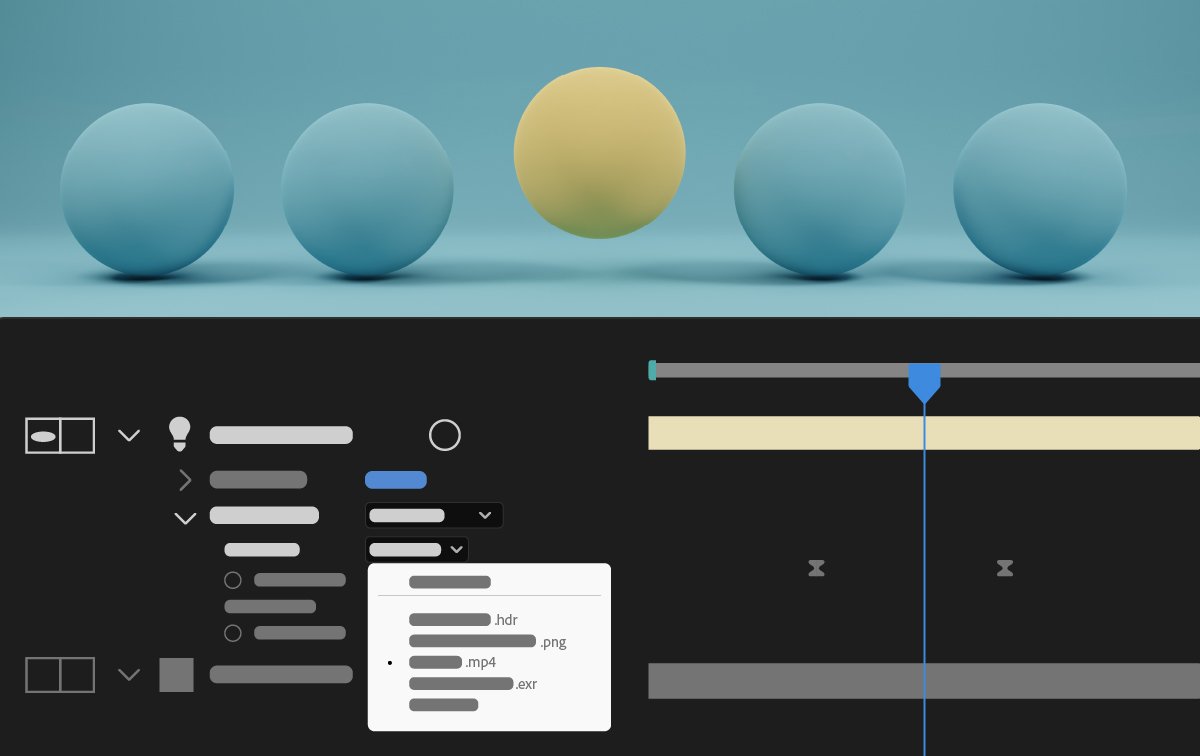
إضاءة البيئة المتحركة
أضئ تركيبات Advanced 3D الخاصة بك عن طريق اختيار تركيب أو فيديو أو طبقة صورة كمصدر للإضاءة المحيطة.

أوامر مساعدة لسير عمل 3D الشائع
استخدم أوامر جديدة لتبسيط سير عمل 3D الشائع بإجراءات بنقرة واحدة، مثل ربط كاميرا بضوء، وتطبيق التأثيرات ثنائية الأبعاد على كائنات ثلاثية الأبعاد، وتصور مصدر الإضاءة المحيطة.

تخصيص شبكات الشفافية
استخدم مجموعة جديدة من الخيارات في تفضيلات Grids & Guides لتغيير حجم وألوان شبكات الشفافية المعروضة خلف محتويات التركيب.

تخصيص ألوان خلفية اللوحة
أضفِ طابعك الشخصي على المنطقة الفارغة حول تركيبك عن طريق تحديد لون الخلفية من خمسة مستويات من السطوع الرمادي أو اختيار لون مخصص.
تعرف على كيفية إضافة الطابع الشخصي للمساحة الفارغة حول التركيب الخاص بك >

احتفظ بمساحة العمل الخاصة بك عند فتح المشاريع
احتفظ بتخطيط مساحة العمل الحالي متسقًا عند فتح المشاريع المحفوظة بمساحات عمل مختلفة في After Effects.

أوامر إنشاء Null الجديدة والمحسّنة
أنشئ أدوات التحكم Null بسهولة لخصائص المواضع مثل نقاط التدرج اللوني للأشكال ونقاط تأثير التحريك ونقاط التأثيرات، مما يبسط سير عملك ويعزز الكفاءة.
انضم إلى مجتمعنا للتواصل والتعلم والمشاركة

إنشاء رسوم متحركة ثلاثية الأبعاد مذهلة في After Effects
قم بتحريك الشخصيات والرسوم التوضيحية، وأضف الحركة إلى النص، والمزيد.
