Select Your files from the Illustrator Home screen.
- What’s new
-
Get started
-
Learn the basics
- Illustrator on desktop technical requirements
- Supported file formats
- Homescreen overview
- Show or hide the homescreen
- Workspace overview
- Modify workspaces
- Manage workspaces
- Switch between the workspace and the homescreen
- Properties panel overview
- Set properties with precise values
- Control panel overview
- Contextual Task Bar overview
- Discover panel overview
- Learn faster with the Discover panel
-
App preferences and settings
- Set app preferences
- Customize keyboard shortcuts
- Find custom keyboard shortcut files
- Export keyboard shortcuts list as a text document
- Delete keyboard shortcuts
- Accessibility features in Adobe Illustrator
- Create accessible content in Adobe Illustrator
- Set up screen reader support
- MacBook Pro Touch Bar in Illustrator overview
- Illustrator controls and contextual operations in MacBook Pro Touch Bar
- Use Microsoft surface dial in Illustrator
-
Learn the basics
-
Add and import files
-
Start new files
- Create documents using presets
- Create and save custom document presets
- New Document dialog overview
- Create documents using blank templates
- Create files with large canvases
- Create documents using templates from Adobe Stock
- Rotate canvas view
- Create and share projects in Adobe Illustrator
- Access projects in the Adobe Illustrator workspace and other apps
- Find and edit Adobe Express templates
- Import from other apps
- Import other file types
- Manage project files
- Manage linked and embedded files
-
Start new files
-
Use generative AI
- Common questions about generative AI features in Adobe Illustrator
- Generate similar variations without text prompts
- Generate scenes, subjects, and icons
- Partner models in Adobe Illustrator
- Use Auto Select
- Generate patterns
- Manage pattern variations
- Edit generated patterns
- Generate shape fills
- Scenarios with repeat shape fill generation
- Recolor artwork with text prompts
- Generate vector graphics to expand artwork
- Options to expand the expanded artwork
- Generate print bleed
- Generate content to expand images
- View 2D objects from new angles
- Remove background from images
- When to use Turntable and 3D
- Generate vector artwork from raster images
- Scenarios with linked variations
- Manage generated variations
- Edit generated artwork using prompts
- Generate, rewrite, proofread, and translate text
-
Draw shapes and paths
- Learn drawing basics
-
Draw shapes
- Draw lines
- Draw arcs
- Draw stars
- Draw spirals
- Draw freeform paths with the Pencil tool
- Draw straight lines with the Pencil tool
- Pencil tool options
- Draw shapes with the Curvature tool
- Draw curves with the Pen tool
- Draw curves followed by straight lines
- Reshape paths with the Pencil tool
- Extend paths with the Pencil tool
- Draw line segments with the Pen tool
- Connect two paths with the Pencil tool
- Draw straight lines followed by curves
- Draw two curved segments connected by a corner
- Preview the path
- Modify live shapes
-
Modify paths
- Refine paths in Illustrator using Anchor Point and Smooth tools
- Refine path segments with the Smooth slider
- Select and edit path segments
- Select anchor points to modify paths
- Convert anchor points on a path
- Average the position of the anchor points
- Add or remove anchor points
- Turn off automatic addition or deletion of anchor points
- Find and delete stray anchor points
- Copy paths
- Auto simplify paths
- Manually simplify paths
- Simplify paths advanced options overview
- Simplify path benefits
- Cut paths
- Erase paths using the Eraser tool
- Erase parts of a path
- Adjust path smoothness
- Refine paths in Illustrator using Anchor Point and Smooth tools
-
Manage objects
-
Select objects
- Object selection methods and preferences
- Select objects
- Select objects by characteristics
- Select objects enclosed in a marquee
- Select object groups and nested object groups
- Select faces and edges in Live Paint groups
- Group or ungroup objects
- Isolate objects
- Save object selections
- Select objects using layers and nested selection
- Select objects using the Magic Wand tool
- Select objects
-
Arrange objects
- Move objects
- Move multiple objects at once
- Move objects by specific distances
- Move or duplicate an object by pasting
- Paste an object relative to other objects
- Align or distribute selected objects
- Distribute objects by specific distances
- Rotate objects
- Expand objects
- Rotate multiple objects individually
- Rotate objects by specific angles
- Reflect or flip objects
- Reflect objects along an axis
-
Edit objects
- Divide or split objects
- Cut objects using the Knife and Scissors tools
- Duplicate objects
- Create duplicate objects using Offset Path
- Edit similar objects
- Edit groups with similar objects
- About clipping masks
- Create clipping masks
- Edit clipping masks
- Add, remove, or release objects from clipping masks
- Hide parts of objects with clipping masks
-
Reshape and transform objects
- Pathfinder panel overview
- Edit areas of overlapping objects with Pathfinder
- Create compound shapes with Pathfinder
- Create compound paths
- Transform objects
- Transform panel overview
- Scale objects
- Scale multiple objects
- Distort object
- Distort objects with envelopes
- Edit the contents of envelopes
- Envelope panel options
- Shear objects
- Intertwine objects
- About perspective drawing
- Draw objects in perspective
- Perspective grid options
- Define and manage perspective grid preset
- Move the perspective grid and adjust its vanishing points
- Adjust grid cell size and grid extent
- Adjust horizon heights and grid planes
- Adjust the perspective grid and the active plane widget
-
Create traces, mockups, and symbols
- Convert images to vector graphics
- Image Trace panel options
- Edit image trace results
- Save image trace presets
- Edit mockups
- Create mockups for images
- Save mockups as templates
- Create and place symbols
- Symbols panel options
- Edit symbols
- Create or import symbol libraries
- Maintain proportions while scaling symbols
- Transform symbols
-
Select objects
-
Measure and align
- Use grids and guides
-
Plot and measure
- Measure the distance between two points
- Measure the area of objects
- Area measurement scenarios
- About Dimension objects
- Plot the linear dimensions of objects
- Plot the angular dimensions of objects
- Plot radial dimensions of objects
- Dimension tool options and settings
- Snap a line perpendicular to a path in Illustrator
- Snap a line tangent to a curve in Illustrator
-
Paint and fill
-
Learn painting basics
- About fills and strokes
- Fill and stroke controls
- Apply fill colors
- Apply stroke colors
- Create multiple fills and strokes
- Convert strokes to compound paths
- Remove fills or strokes
- Select objects with same fill and stroke
- Paint tools overview
- Merge paths using the Blob Brush tool
- Blob brush options and best practices
- About Live Paint
- Create Live Paint groups
- Paint with the Live Paint Bucket tool
- Modify Live Paint groups
- Find and close gaps in Live Paint groups
-
Apply and edit strokes
- About brushes
- Brushes panel overview
- Draw paths with brush strokes
- Apply brush strokes to paths
- Remove brush strokes
- Customize arrowheads
- Add arrowheads to paths
- Paintbrush tool options
- Create brush libraries
- Import brushes
- Create brushes
- Create dotted or dashed lines
- Modify brushes
- Change the caps or joins of a line
- Convert brush strokes to outlines
- Create and edit gradients
- Create and edit meshes
- Create and edit patterns
-
Learn painting basics
-
Manage colors
- Learn color basics
-
Select and adjust colors
- About selecting colors
- Color Picker overview
- Select colors using the Eyedropper and Color Picker tool
- Color panel options
- Select colors using the Color panel
- Convert color modes
- Make colors printable or web safe
- Change colors to their inverse or complement
- Get precise spot colors using lab values
- Adjust saturation of multiple colors
- Adjust color balance
- Blend colors
- Change color tints
- Select colors using the Eyedropper and Color Picker tool
-
Use swatches
- About Swatches
- Swatches panel overview
- Add colors to swatches
- Create swatches from the Color Guide panel
- Create process color swatches
- Create spot-color swatches
- Create gradient swatches
- Reorder swatches
- Duplicate swatches
- Replace, merge, or delete swatches
- Group swatches
- Move colors into swatch groups
- Create and open swatch libraries
- Edit swatch libraries
- Move swatches from swatch libraries to the swatches panel
- Share swatches between applications
-
Modify colors
- Recolor artwork
- Recolor options overview
- Edit colors using Edit Colors dialog
- Modify colors in swatch groups
- Apply local or global changes to color properties
- Assign new colors to selected artworks
- View original colors in artworks
- Limit colors in artworks
- Color reduction options
- Edit swatch groups using the color wheel
- Add or remove colors from swatch groups
- Edit an individual color in color groups
- Delete swatch groups
-
Apply transparency and blending
- Transparency panel overview
- Adjust opacity
- Opacity mask overview
- Adjust transparency using opacity masks
- Clip and invert opacity masks
- Deactivate, reactivate, or remove opacity masks
- Create knockout shapes
- Create transparency knockout groups
- View transparency in the artwork
- Blended objects overview
- Blending mode types
- Change and manage blending modes
- Create blends
- Blend Options overview
- Modify the spine of blended objects
- Reverse the stacking order in blended objects
- Release or expand blended objects
- Blend panel overview
-
Design with text
-
Add and manage text
- Add or remove placeholder text
- Wrap or unwrap text around objects
- Resize the text area
- Add rows and columns to text
- Add margins to text and adjust the first baseline
- Create text threads between objects
- Remove or break text threads between objects
- Add text to vector artwork
- Add text in Illustrator with Type, Area Type, and Touch Type tools
-
Work with fonts and scripts
- Font browser overview
- Find and apply fonts
- Organize fonts using Creative Cloud Libraries in Adobe Illustrator
- Apply the fonts organized in Creative Cloud Libraries
- Supported font file types in Adobe Illustrator
- Find, apply, and adjust variable fonts
- Find and replace fonts
- Preview, add, or replace missing fonts
- Identify fonts using Retype
- Edit text without replacing missing fonts
- Edit fonts
- Apply Retype-suggested fonts to live text
- About Adobe Asian composers
- Justify text using Kashida and hyphenation
- Format Japanese text in Illustrator
- Mojikumi and Kinsoku settings in Illustrator
- Mojikumi and Kinsoku overview for Japanese text formatting
-
Edit and format text
- Character panel overview
- Transform text
- Underline or strikethrough text
- Change case and capitalization styles
- Adjust kerning and tracking
- Vary font height
- Turn fractional character widths off or on
- Paragraph panel overview
- Align text
- Adjust word and letterspacing in justified text
- Indent text
- Adjust paragraph spacing
- Create bulleted or numbered lists
- Move or flip text
- Adjust text alignment and spacing on paths
- Apply effects to text on paths
-
Use special characters and glyphs
- About character sets and alternate glyphs
- Insert special characters
- Glyphs panel overview
- Replace characters with alternate glyphs
- OpenType panel overview
- Use ligatures and contextual alternates
- Use swashes, titling alternates, or stylistic alternates
- Add stylistic sets to selected text
- Insert white space and break characters
- Snap to Glyph options
- Snap with glyph guides
- Snap glyph to angles, anchor points, or text area
-
Add and manage text
-
Create and manage artboards
- Add and edit artboards
-
Organize and manage artboards
- Use the artboard context menu
- Cut, copy, and paste artboards
- Move artboards
- Rearrange artboards
- Reorder artboards
- Align and distribute artboards
- Lock artboards
- Modify display settings of artboards
- Set artboard views
- Apply colors to artboards
- Set video display options for artboards
- Export selected artboards
-
Manage layers
- Create and organize layers
- Lock and hide layers
- Apply and modify layer effects
-
Apply special effects and styles
- Apply filter effects
- Create 3D graphics
- Apply graphic styles
-
Automate and visualize data
-
Automate actions
- Actions panel overview
- Create new actions
- Insert non-recordable tasks into actions
- Specify playback speed
- Insert stops in actions
- Exclude commands from actions
- Add commands to actions
- Re-record actions
- Manage a set of actions
- Play actions on a batch of files
- Batch options
- Install and run scripts
- Merge data
- Set up data source files
- Import data source files
- Variable panel overview
- Work with variables
- Edit dynamic objects
-
Visualize data
- Data sets and label options
- Create graphs
- Add graph data
- Add graph labels and data sets
- Adjust decimal digits and column width
- Format columns, bars, and lines
- Select parts of a graph
- Change graph types
- Change graph value axes
- Assign different scales to value axes
- Change the position of legend in graphs
- Combine different graph types
- Add drop shadows to graphs
- Apply marker designs to graphs
- Format pie graphs
- Format graph text
- Reuse graph designs
-
Automate actions
-
Save and export
- Export files to different formats
- Export to other apps
- Troubleshoot
- Use Ai Assistant in Illustrator
Upload and download project files in Illustrator
Posledná aktualizácia dňa
1. 6. 2026
Learn how to upload and download files in Illustrator Projects using single or bulk actions.
You can upload and download files in Illustrator directly from the Home screen using single or bulk operations. Upload files to organize assets in projects, or download individual files, folders, or multiple items together for offline access and sharing.
Upload files
Select Add , and then select Upload .
Select one or more files from your device.
Select Open.
Download a single file
Select Your files from the Illustrator Home screen.
Select a file, and then select More options .
Select Download .
Select a location on your device to download your file.
Select Choose.
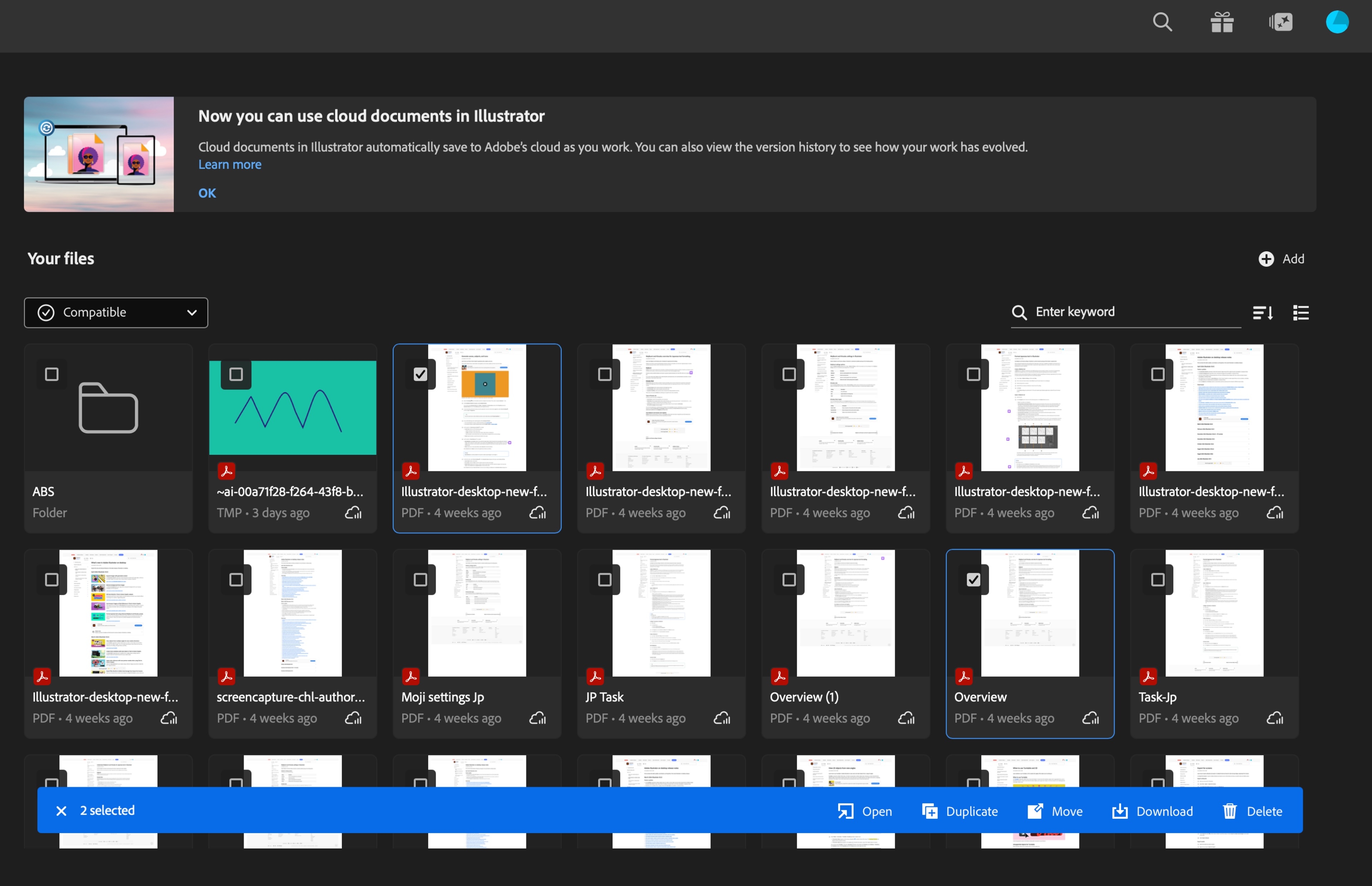
Download multiple files
Select Your files from the Illustrator Home screen.
Select all the files you want to download by selecting the checkbox next to each file.
Select Download from the Toast that appears.
Select a location on your device to download your file.
Select Choose.

Navrhujte s presnosťou v Illustrator
Oživte svoje nápady pomocou nástrojov pre vektorovú grafiku vytvorených pre tvorivú slobodu a presnosť.
