

לקבלת טיפים מהמומחים ופתרונות לבעיות נפוצות, בקרו בפורומים של קהילת Adobe After Effects.צרו קשר עם הצוות שלנו ועם משתמשים אחרים כדי להחליף רעיונות, לשתף את היצירות שלכם, להישאר מעודכנים עם התכונות וההכרזות החדשות ביותר, ולתת משוב.
עודכן לאחרונה בתאריך
28 בספטמבר 2026
גלו את התכונות החדשות והמשופרות במהדורות האחרונות של Adobe After Effects.
מהדורת ספטמבר 2026 (גרסה 26.5)
?$png$&jpegSize=300&wid=1920)
פונקציונליות חדשה למדריכים ב-After Effects
השתמשו במדריכים החדשים התומכים במיקום מבוסס אחוזים, הצמדת קצוות, צבעי מדריך מותאמים אישית ושליטה משופרת בעריכת מדריכים.
למדו על יצירה וניהול של מדריכים ›

שמירה זמנית בדיסק עבור Object Matte
השמירה הזמנית בדיסק שומרת על התוצאות המופצות של Object Matte גם לאחר שאתם סוגרים את הפרויקט, משחררת זיכרון RAM ומאיצה את העבודה על קליפים ארוכים.
למדו על Object Matte מבוסס בינה מלאכותית ›

תוויות צבע עבור אפקטים
הקצו תוויות צבע למופעי אפקט בודדים בלוח Effect Controls כדי לארגן, לזהות ולעבוד עם האפקטים שלכם בקלות רבה יותר.
למדו על תוויות צבע בלוח Effect Controls ›

מודרניזציה של לוח Effect Controls
השתמשו בלוח Effect Controls המעודכן, הבנוי על מסגרת מודרנית, כדי להציג ולנהל אפקטים עם בקרות מבוססות אייקון.
למידע נוסף על לוח Effect Controls ›

תמיכה ב-ACES 2.0 ב-After Effects
עבדו באופן טבעי ב-ACES 2.0 באמצעות ספריית OpenColorIO (OCIO) 2.5.1 המשודרגת, בחרו משתי תצורות כלולות, ACES 2.0 CG v4.0 ו-ACES 2.0 Studio v4.0, כדי להתאים לתהליכי העבודה שלכם.
למדו על ניהול צבעים OpenColorIO ו-ACES ›

נסו ב-Adobe After Effects
התחילו לחקור את העדכונים וההשבחות האחרונים ב-After Effects עכשיו.
מהדורת יוני 2026 (גרסה 26.3)

Create and use Depth of Field in the Advanced 3D renderer
Create a Depth of Field effect that lets you focus on 3D models, parametric meshes, Substance 3D materials, 3D text, shape layers, and more in Advanced 3D.
Learn to enable in‑engine Depth of Field ›

Copy and paste Illustrator and SVG content
Paste SVG content from Illustrator or other apps directly into After Effects as native, editable shape layers using Edit > Paste.
Learn to copy and paste Illustrator and SVG content ›

Updated Mask Tracker
Track masks faster and more accurately with the updated mask tracker, now up to 5x faster with accessible controls that let you start tracking directly from the Timeline panel.
Learn about mask tracking in After Effects ›

Copy a frame to the clipboard
Capture the currently rendered frame as a still image from the Composition, Footage, or Layer panel and copy it to your system clipboard in a single click.
Learn to copy a frame to the clipboard ›

Curl Noise effect for swirling animated 2D patterns
Create fluid, organic 2D noise that feels like smoke, water, or ink, ideal for smooth, flowing motion in backgrounds, textures, and abstract animations.
Learn about Curl Noise effect ›

Quickly Find Variable Fonts by Axis
Filter the font list to show only variable fonts, making it easier to find the right fonts.
Learn to work with Variable Font Axes ›
מהדורת אפריל 2026 (גרסה 26.2)

AI-powered Object Matte
Use the Object Matte tool to automatically select, isolate, and track subjects in your composition using single-click AI-powered subject selection.
Learn to use Object Matte ›

Displacement support for 3D materials on parametric meshes
Use displacement to push a mesh into 3D space using height data, adding subtle texture for realism or turning simple shapes into detailed models.
Learn to use Displacement Options ›

Search and instantly apply effects, presets, or commands
Use Quick Apply to quickly search for any effect, animation preset, or menu command, then select what you need and apply or run it instantly.
Learn to use Quick Apply ›

Proportional Scrubbing in timeline
Distribute changes across multiple layers proportionally by dragging a selected property's hot‑text values, enabling faster, more intuitive multi‑layer adjustments.
Learn to use Proportional Scrubbing ›

Import SVG file as footage or as a composition
Import SVG files as a composition with editable vector layers or as rasterized footage, allowing you to choose the level of flexibility that best fits your project.
Learn to import SVG files as footage ›

Substance 3D Materials (SBSAR)
Apply Substance Materials (.sbsar files) to 3D models and parametric meshes to explore a wide range of visual styles and achieve stylized looks.
Learn to apply Substance 3D Materials to 3D models ›

Create parametric meshes
Use the new mesh tool to create parametric shapes such as spheres, cubes, and cones directly within the app, and customize or animate their size, shape, and appearance.
Learn to create parametric meshes ›

Enable lights to cast shadows
Add multiple shadow-casting Spot, Parallel, and Environment lights to your 3D scene when using the Advanced 3D renderer in a 3D composition.
Learn to enable lights to cast shadows ›

Support for Variable Font Axes
Animate OpenType Variable fonts in After Effects, using a single font file that includes multiple styles for precise control over weight, width, and style.
Learn more about Variable Font Axes ›

Improved Illustrator layer conversion
Illustrator layers now preserve gradient fills, strokes, and transparency when converted to native shape layers, which also support animatable Scale and Rotation for gradients.
Learn how to convert Illustrator layers to shape layers ›

Import SVG files as vectors
Import SVG files directly into your composition and convert them into editable shape layers, ready for customization and animation.
Learn how to import SVG files as native, editable shape layers ›

Unmult effect for Keying transparency
Remove solid black or white backgrounds from footage while preserving the colors and details of the foreground for compositing or other visual effects.
Learn how to use the Unmult effect ›

Lossless Compressed Playback
Preview longer segments of your timeline while using significantly less disk space, without compromising visual quality.
Learn how Lossless Compressed Playback can help you ›

Crop composition to selected layer(s) bounds
Crop your composition to the selected layers’ bounds by shrinking it to fit smaller content or expanding it to include elements that extend beyond the current frame.
Learn how to crop composition to selected layer bounds ›

New built-in audio effects
Add new audio effects— Distortion, Compressor, and Gate to enhance and manage sound in your compositions, giving you precise control over audio directly within After Effects.
Explore audio effects available in After Effects ›

Refreshed After Effects Preferences
Improved grouping and preference organization for faster access and a more efficient workflow.
Explore the refreshed After Effects preferences ›

New expression and scripting enhancements
Quickly locate the keyframe or marker before or after a specific time, and read the current text value along with the full list of dropdown menu items.
Learn about dropdown menu attributes ›

Windows ARM native support
After Effects now runs natively on Windows ARM systems, delivering improved performance and efficiency for ARM-based devices.
Learn about support for ARM-based Windows devices ›

Improved UI language support
Run After Effects in languages different from the OS display language, enter Unicode characters in UI elements, mix multiple language scripts in a single text field, and more.
Learn about UI language support in After Effects ›

Extensive fixes and improvements
New improvements and fixes in After Effects make it easier and faster to work on your projects, helping you get things done more efficiently.
Explore all the fixed issues ›

Modify Default Camera Settings
Use the View menu to adjust the custom view and Default Camera Settings, whether viewing through a camera layer, the default active camera, or a custom view.
Learn to adjust Default Camera Settings for 3D compositions ›

Single 3D Gizmo for multiple 3D layers
Select multiple 3D layers and control them together using a single gizmo to simplify managing complex scenes and reduce visual clutter in your workspace.
Learn to use a single 3D Gizmo control for multiple 3D layers ›

Tip of the Day
Find quick, practical insights into features, time-saving shortcuts, and best practices each time the Composition, Footage, or Layer panels are reloaded or empty.
Learn more about the Tip of the Day feature ›

הזיזו במהירות את השכבות והפריימים המפתח
צרו אנימציות על ידי הארכת השכבות או פריימים מפתח על פני שכבות מרובות לאורך זמן עם קיצור דרך פשוט במקלדת.

העתיקו והדביקו רק את עיצוב הטקסט
החילו רק את עיצוב הטקסט על שכבת טקסט שלמה או מילה ספציפית באמצעות הפקודה Paste Text Formatting Only.

תמיכה במטא‑נתונים של CICP
ייבוא וייצוא של תוכן HDR עם מטא‑נתונים של CICP להבטחת ניהול צבעים מדויק ועקביות בין מכשירים ופלטפורמות שונים.
?$pjpeg$&jpegSize=200&wid=1200)
למדו על Effects לפני שתחילו אותם
השתמשו בלחצני המידע לצד כל אפקט בלוח Effects & Presets לעיון מהיר בזמן העבודה.

Smooth Zoom
חוו הגדלה חלקה ורהוטה תוך גלילה, שימוש ב-Pinch-to-zoom, או אטייה עם הכלי Zoom בלוחות Composition, Layer ו-Footage.

הצגת פרויקטים במערכת הקבצים
חשפו מיד את מיקום קובץ הפרויקט, חסכו זמן ומאמץ על ידי הימנעות מחיפוש ידני בתיקיות המערכת.

תמיכה בכרטיסי ה-GPU של ארכיטקטורת NVIDIA Blackwell
האצה חומרתית של וידאו 10-bit 4:2:2 מספקת ביצועי השמעה משופרים משמעותית.

השמעת תצוגה מקדימה בביצועים גבוהים
חוו השמעת תצוגה מקדימה חלקה יותר ומשכים ארוכים משמעותית ללא כל מגבלה של גודל זיכרון RAM המוקצה ל-After Effects.

תמיכה בתצוגה מקדימה ב-HDR
צפו ועקבו אחר העבודה שלכם ב-HDR עבור עיצוב תנועה וeffects (אפקטים) ויזואליים בטווח דינמי רחב (HDR).

בקרת אנימציה של מודלים תלת-ממדיים בלוח המאפיינים
שנו בקלות את אפקטי התאורה והצללים על Layer (שכבה) של מודל תלת-ממדי ובחרו אנימציות מוטמעות דרך לוח המאפיינים.
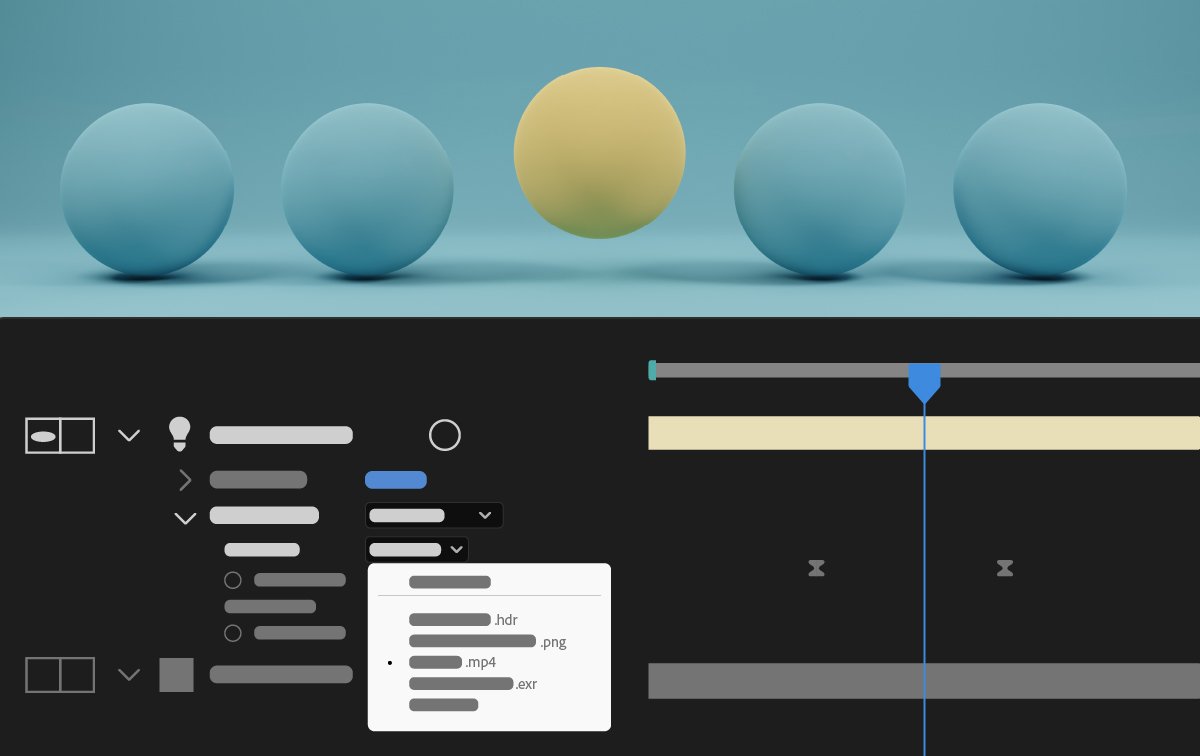
תאורת סביבה מונפשת
האירו את הקומפוזיציות שלכם ב-Advanced 3D על ידי בחירת קומפוזיציה, וידאו או Layer (שכבה) של תמונה כמקור תאורת סביבה.

פקודות עזר לתהליכי עבודה נפוצים בתלת-ממד
השתמשו בפקודות חדשות כדי לפשט תהליכי עבודה נפוצים בתלת-ממד באמצעות פעולות בלחיצה אחת, כגון קישור מצלמה לאור, החלת Effects (אפקטים) דו-ממדיים על אובייקטים תלת-ממדיים והצגת המקור של תאורת סביבה.

התאמה אישית של רשתות שקיפות
השתמשו בערכת אפשרויות חדשה בהעדפות Grids & Guides כדי לשנות את הגודל והצבעים של רשתות השקיפות המוצגות מאחורי תוכן הקומפוזיציה.

התאמה אישית של צבעי רקע הלוח
התאימו אישית את האזור הריק מסביב לקומפוזיציה שלכם על ידי בחירת Background Color (צבע רקע) מחמש רמות בהירות אפור או בחירת צבע מותאם אישית.

שמירה על Workspace בעת פתיחת פרויקטים
שמרו על פריסת סביבת העבודה הנוכחית באופן עקבי בעת פתיחת פרויקטים ששמורים עם סביבת עבודה שונה ב-After Effects.

פקודות יצירת Null חדשות ומשופרות
צרו בקלות בקרות Null לתכונות מיקום כגון נקודות מעבר צבע של צורות, נעצי מריונטה ונקודות אפקט, תוך פישוט תהליכי העבודה שלכם ושיפור היעילות.
הצטרפו לקהילה שלנו כדי ליצור קשרים, ללמוד ולהשתתף

יצירת אנימציות תלת-ממד מדהימות ב-After Effects
הנפש דמויות ואיורים, הוספת תנועה לטקסט ועוד.
