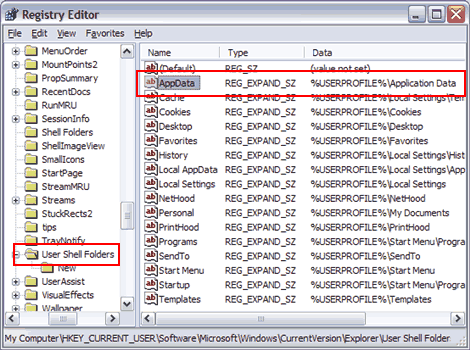
HKEY_CURRENT_USER\Software\Microsoft\Windows\CurrentVersion\ Explorer\User Shell Folders\
Issue
Some Windows users are reporting that their FTP usernames and passwords in their Dreamweaver site definitions are deleted when they close and re-open Dreamweaver 8 or when they reboot their machine. This issue does not occur in earlier versions of Dreamweaver. (Ref. 205051, 210466)
Reason
There are two known causes for this issue:
- The most common cause is that Internet Explorer 7 (IE 7) is installed on the same machine as Dreamweaver 8.
- A less likely cause is that the following registry key is missing or is empty:
HKEY_CURRENT_USER\Software\Microsoft\Windows\CurrentVersion\ Explorer\User Shell Folders\AppData
Solution
If you have Internet Explorer 7 installed
If you have Internet Explorer 7 installed, then installing theDreamweaver 8.0.2 Updater should resolve this issue. Before installing the Dreamweaver 8.0.2 Updater, it is recommended to check the Dreamweaver 8 Emerging Issues TechNote for changes that may affect your workflow, particularly if you create server-side pages (ASP, PHP, ColdFusion, etc.) or insert Flash content.
Note: After you install the Dreamweaver 8.0.2 Updater, verify that the updater successfully installed. Some users think they have installed 8.0.2, when in fact the updater installation didn't take. In Dreamweaver, go to Help > About Dreamweaver > and click the scrolling text to reveal the version number. It should say Dreamweaver 8.0.2. If it still says Dreamweaver 8.0 or 8.0.1, please see Can't install Dreamweaver 8 updaters for Windows after canceling updater installer (TechNote 785362aa).
Note: Internet Explorer 7 was released after Dreamweaver 8 and therefore was not tested with Dreamweaver 8 and earlier.
If you do not have Internet Explorer 7 installed or if the Dreamweaver 8.0.2 Updater doesn't solve the problem
If you didn't have Internet Explorer 7 at the time this problem occurred, then install the Dreamweaver 8.0.2 Updater as described above, and then perform the following steps if you are comfortable editing the Windows Registry.
Warning: Editing the Windows Registry incorrectly can cause serious problems that may require reinstalling your operating system. Adobe does not guarantee that problems caused by editing the registry incorrectly can be resolved. Edit the registry at your own risk.
HKEY_CURRENT_USER\Software\Microsoft\Windows\CurrentVersion\ Explorer\User Shell Folders\
If the solutions above don't solve the problem, then please contact Adobe Technical Support or submit a bug report and specify that you are experiencing the issue described in TechNote 3491671c.
Build beautiful websites in Dreamweaver
Design, code, and manage dynamic websites in a powerful all-in-one tool.