Click the link provided in the Review and sign e-mail.
- Adobe Acrobat Sign User's Guide
- What's New
- Get Started
-
Recipient experiences
- Email options
-
E-signing page options
- The recipient's e-signing page
- Open a view to read the agreement
- Decline to sign the agreement as a recipient
- Delegate your authority in the agreement to another person
- Restart the agreement from the first recipient
- Download a PDF of the agreement
- View the events in the agreement history
- View the agreement messages from the sender
- Convert an agreement to be printed and manually signed
- Convert a written signature process back to electronic signature
- Navigate through the form fields of the agreement
- Recipient e-signing experience when using Mobile Focus
- Clear the data you have entered into the agreement fields
- E-sign page magnification and navigation
- Change the language of the page controls
- Review the Legal Notices for Adobe Acrobat Sign
- Adjust your Cookie Preferences
-
Users
- Profile and preferences
- Sharing user content
- Address book
- Home page
-
Send agreements
- Send page overview
- Recipient signing order - signature cycle
- Compose a hybrid recipient workflow
- Send an agreement with only yourself as a signer
- Request signatures from others
- Send an agreement using e-Witnesses
- Use templates to send agreements
- Obtain a written signature
- Compose an agreement for in-person signing in Acrobat Sign
- Set a completion deadline in Adobe Acrobat Sign
- Add a password to protect viewing of the PDF
- Use clickable links in message fields
- Sign agreements
-
Manage agreements
- Overview of the Manage page
- Create a copy of an agreement
- Replace a recipient in an active agreement
- Cancel an agreement in Adobe Acrobat Sign
- Add and edit reminders from the Manage page
- Review an agreement's reminders
- Cancel a reminder for an agreement
- Text search in Adobe Acrobat Sign
- Open and View an agreement
- Create a template from an agreement
- Hide or Unhide an agreement from view on the Manage page
- Upload a signed copy of the agreement
- Modify a sent agreement's documents or fields
- How to edit a recipient's authentication method after the agreement has been sent
- Add, edit, or remove the Expiration Date (Completion Date)
- Add a note to a signing transaction
- Share an individual agreement
- Unshare an agreement
- Download the PDF of an agreement
- Download the individual files of an agreement
- Export the field data for an individual agreement
- Bulk actions
- Audit reports
-
Reporting and Exporting data
- Reports and Data Exports
- Edit an existing Report chart
- Transaction consumption reports
- Agreement reports
- Create a new report chart
- Download the content of a data export
- Refresh the content in an existing data export
- Edit an existing data export
- Web form data export
- Create a new data export
- Rename an export or chart report
- Duplicate an export or chart report
- Schedule an export or chart report
- Delete an export or chart report
-
Form field authors
- In-app authoring environment
- Create forms with text tags
- Create forms with Acrobat
- Form field reference
- Setting form field show/hide conditions
- Add calculated fields to a form
- Verified forms
- Adobe Acrobat Sign Authoring - FAQ
-
Advanced users
- Send in Bulk
- Webforms
- Reusable templates
- Custom workflows
-
Power Automate Workflows
- Overview and entitlements included with the Microsoft Power Automate integration
- Enable the Power Automate integration
- In-Context Actions for Power Automate on the Manage Page
- Track your Power Automate usage
- Create a new Power Automate flow in the Acrobat Sign environment
- Triggers for Power Automate flows
- Import external Power Automate flows into Acrobat Sign
- Access and manage your Power Automate flows
- Edit Power Automate flows within the Acrobat Sign environment
- Share Power Automate flows to other users in your Acrobat Sign organization
- Disable Power Automate flows
- Delete Power Automate flows
-
Useful PA Templates for Admins
- Save all completed documents to SharePoint
- Save all completed documents to OneDrive for Business
- Save all completed documents to Google Drive
- Save all completed documents to DropBox
- Save all completed documents to Box
- Save your completed documents to SharePoint
- Save your completed documents to One Drive for Business
- Save your completed documents to Google Drive
- Save your completed documents to Box
- Save completed webform documents to SharePoint Library
- Extract field data from your signed document and update Excel sheet
- Get your Adobe Acrobat Sign notifications in a Teams Channel
- Generate doc from Power App form and Word template, send for signature
-
Administers
- Set up your Acrobat Sign company account
-
User provisioning
- Authenticate your signers using your SSO solution (and optionally entitle them to use the Acrobat Sign product)
- Enable SSO for direct Acrobat Sign access
- Provision Acrobat Sign users with SSO
- Configure user auto-assignment rules
- Move a user from one Admin Console organization to another
- Create Technical Accounts to send agreements via API
- Create Service Accounts to send agreements under a functional entity
-
User management
- Change your email or name in Acrobat Sign
- Edit a user's group membership
- Grant users access to reporting data
- Set authority levels for admins and users
- Edit a user’s Admin Console roles
- Promote users to privacy admin status
- Manage user and group content shares
- Log in to your Adobe Acrobat Sign account
- Group management
- Asset management
- Admin reports
-
Settings configuration
- Configuring the Adobe Acrobat Sign environment
-
Global Settings
- Enable the modern Recipient Experience
- Configure Self Signing Workflows
- Configure access to Send in Bulk
- Configure Web Forms
- Enable Custom Send Workflows
- Configure access to Power Automate workflows
- Configure access to create reusable library templates
- Collect form data with agreements
- Limit document visibility for agreement participants
- Attach a PDF copy of the signed document in emails sent to
- Suppress the email link to the online signed agreement
- Suppress the image of the first page of the agreement in emails
- Files attached to email will be named as
- Attach audit report to emails and downloads in Acrobat Sign
- Merge multiple documents into one document after signing
- Allow recipients to download individual files
- Empower senders to upload physically signed documents
- Adobe Acrobat Sign delegation settings for internal users
- Set a default time zone to use for agreements
- Configure the default date format to use for agreements and signatures
- Upgrade your account to allow Users in Multiple Groups (UMG)
- Assign users to multiple groups
- Group Administrator Permissions
- Configure the option to replace a recipient on an agreement
- Configure the content of your Audit Reports
- Verify agreement validity
- Include view events in the audit report
- Include page counts in the audit report
- Add the transaction ID and document name to each page of the agreement
- Enable in-product messaging and guidance
- Enforce PDF/A workflows for long-term archiving
- Enable the Acrobat Sign Smart Assistant Chatbot
- Configure the New request signature experience
- Enable the New custom workflow experience
- Enable the modern Create Template experience
- Account Setup / Branding Settings
-
Signature Preferences
- Well-formatted signatures - Control the line and print text
- Configure how you will allow recipients to sign and initial agreements
- Capture signature on mobile device
- Configure Terms of Use and Consumer Disclosure acceptance
- Hiding Guided Navigation While Signing
- Allow recipients to restart agreements
- Configure Decline options for recipients
- Allow Stamp Images and Signatures
- Allow signers to print, place written signatures and upload the agreem
- Set up Mandatory Mobile Signature Capture
- Request IP address from recipients for the audit report
- Enable drawn signature scaling
-
Digital Signatures
- Overview of Digital Signatures in Adobe Acrobat Sign
- Download and sign with an Acrobat certificate
- Enable cloud-based digital signatures
- Configure bulk digital signatures from Manage in Acrobat Sign
- Require digital signatures for specific recipients
- Send metadata to the cloud signature provider
- Configure a restricted Identity Provider
- Configure auto-provisioning for partner applications
- Create electronic seals in Adobe Acrobat Sign
- Digital Identity
- Report Settings
-
Security Settings
- Restrict user access to Acrobat Sign using allowed IP address ranges
- Administrator managed sharing
- Configure Account Sharing Permissions
- Agreement sharing controls
- Signer Identity Verification
- Define the complexity of user-applied passwords
- Block signers within a specific geography
- Allow page extraction from agreement PDFs
- Document link expiration
- Stand-alone timestamp certificates for electronic signatures
- Block iframe embedding in Acrobat Sign
-
Send Settings
- Configure document editing during authoring
- Agreement creation experiences
- Require recipient name when configuring an agreement or web form
- Lock Name values for known users when authenticating
- Allow various recipient roles
- Configure the e-Witness role for recipients
- Configure in-person signing in Acrobat Sign
- Enable recipient groups
- Configure CC notifications as part of a recipient record
- Configure OneDrive file upload
- Automatically "flatten" PDF documents when uploaded
- Allow User to Modify Agreements
- Remove recipients from in-flight agreements
- Enable private messages to recipients
- Allowed signature types
- Set reminders for the agreement recipients
- Allow senders to add passwords to protect viewing the agreement PDF
- Send notifications through SMS or WhatsApp in Adobe Acrobat Sign
- Adobe Acrobat Sign Identity Authentication Methods
- Signing Password
- Knowledge-based authentication
- Phone authentication
- WhatsApp authentication
- One Time Password via Email
- Acrobat Sign Authentication
- Cloud-based digital signatures
- Digital Identity Provider authentication
- Government ID authentication
- Signer Identity Report
- Configure Content Protection
- Configure Automatic Document Expiration (Completion deadline)
- Signature order options
- Configure hybrid recipient routing
- Configure internal recipient restrictions in Acrobat Sign
- Configure the Download agreement link
- Form Field Borders
- Liquid Mode for Mobile Web Signing Experience
- Enable Template-Defined Signature Placement in Custom Workflows
- Enable Acrobat Sign to tag uploaded PDFs for accessibility
- Restricted access to agreements
- Message Templates
- Bio-Pharma Settings
- Notarize integration with Acrobat Sign
- Set up online payments
- SAML Settings
- Data Governance
- Set up an archive for your agreements
-
Email Settings
- Email header and footer images
- Enable and configure the user's personal email footer
- Adobe Acrobat Sign - Suppress email addresses in agreement notifications
- Adobe Acrobat Sign - Suppress email addresses in To and CC fields of the email header
- Enable linkless notifications
- Use customized email templates
- Understand the Acrobat Sign tracking pixel
- Migrating from echosign.com to adobesign.com
- Customize the Options for Recipients on the e-sign page
-
Guidance for regulatory demands
- Accessibility
- HIPAA configurations in Adobe Acrobat Sign Solutions
- GDPR
- 21 CFR part 11 and EudraLex Annex 11
- EU/UK considerations
- Comply with IVES
- Report Abuse links
-
Integrations
- Adobe Acrobat Sign Integrations
- Product versions and lifecycle
- Integration keys
-
Acrobat Sign for Salesforce
- Acrobat Sign for Salesforce: Install the package (v24)
- Acrobat Sign for Salesforce: Configure the package
- Adobe Acrobat Sign for Salesforce: Upgrade Guide
- Adobe Acrobat Sign for Salesforce: Release notes
- Adobe Acrobat Sign for Salesforce (Lightning profile): User Guide
- Acrobat Sign for Salesforce Mobile
- Enable authentication with digital identity providers
- Adobe Acrobat Sign for Salesforce: Mappings and Templates Guide
- Using Acrobat Sign Document Builder for Salesforce
- Configure Large Documents and Push Agreements Service
- Adobe Acrobat Sign for Salesforce: Customization Guide
- Adobe Acrobat Sign for Salesforce: Developer Guide
- Acrobat Sign for Salesforce: Other Guides
- Adobe Acrobat Sign for Salesforce: FAQs
- Acrobat Sign for Salesforce: Troubleshooting Guide
- Microsoft: Office
- Microsoft: Teams
-
Microsoft: Dynamics
- Acrobat Sign for Microsoft Dynamics
- Adobe Acrobat Sign for Microsoft Dynamics 365 Online: Installation Guide
- Adobe Acrobat Sign for Microsoft Dynamics Online: User Guide
- Adobe Acrobat Sign for Microsoft Dynamics 365 On-Premises: Installation Guide
- Adobe Sign for Microsoft Dynamics On-Premises: User Guide
- Adobe Acrobat Sign for Microsoft Dynamics Workflows: User Guide
- Adobe Acrobat Sign for Microsoft Dynamics 365 Talent
- Adobe Sign for Microsoft Dynamics: Upgrade Guide
- Adobe Acrobat Sign for Microsoft Dynamics 365: Release Notes
- Microsoft: Power Automate
- Microsoft: Search connector
- ServiceNow
- SAP SuccessFactors
- Workday
- NetSuite
- Adobe Acrobat Sign for SugarCRM
- VeevaVault
- Adobe Acrobat Sign for Coupa BSM Suite: Installation Guide
- Zapier
-
Developers
- REST APIs
- Webhooks
- Sandbox
- System-level resources
- Support
Signan agreement via email link
Last updated on
May 8, 2023
Prefer video instruction?
Sign via email link
-
-
Click in the fields and enter any requested information.
-
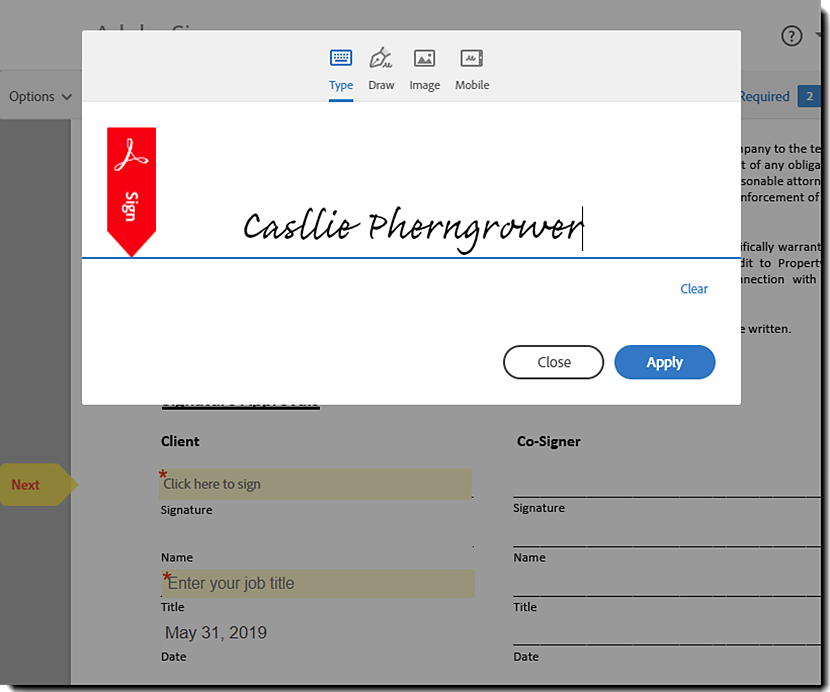
Click in the signature field. A pop-up window appears.
-
Enter your name in the Name section at the top of the pop-up window. Review the generated signature or click the Draw icon and draw your signature with your mouse.
-
Click Apply
-
Click the Click to Sign button.


Streamline your work with Acrobat Sign
Manage and sign documents online quickly and easily.
