For expert tips and solutions to common issues, visit the Adobe After Effects Community Forums. Connect with our team and fellow users to exchange ideas, share your creations, stay updated with the latest features and announcements, and provide feedback.
Last updated on
Sep 18, 2026
Explore the new and enhanced features in the latest releases of Adobe After Effects.
September 2026 release (version 26.5)
?$png$&jpegSize=300&wid=1920)
New guides functionality in After Effects
Use the new guides, which support percentage-based positioning, edge pinning, custom guide colors, and improved guide editing controls.
Learn about guide creation and management ›

Disk Caching for Object Matte
Disk caching keeps your propagated Object Matte results even after you close the project, freeing up RAM and speeding up work on long clips.
Learn about AI-powered Object Matte ›

Color labels for effects
Assign color labels to individual effect instances in the Effect Controls panel to organize, identify, and work with your effects more easily.
Learn about color labels in Effect Controls panel ›

Effect Controls panel modernization
Use the updated Effect Controls panel, built on a modern framework, to view and manage effects with icon-based controls.
Learn more about Effect Controls panel ›

ACES 2.0 Support in After Effects
Work natively in ACES 2.0 using the upgraded OpenColorIO (OCIO) 2.5.1 library, choosing from two included configurations, ACES 2.0 CG v4.0 and ACES 2.0 Studio v4.0, to match your workflow.
Learn about OpenColorIO and ACES color management ›

Try it in Adobe After Effects
Start exploring the latest updates and enhancements in After Effects now.

Release notes
Review a summary of updates and fixed issues for Adobe After Effects releases.

June 2026 release (version 26.3)

Create and use Depth of Field in the Advanced 3D renderer
Create a Depth of Field effect that lets you focus on 3D models, parametric meshes, Substance 3D materials, 3D text, shape layers, and more in Advanced 3D.
Learn to enable in‑engine Depth of Field ›

Copy and paste Illustrator and SVG content
Paste SVG content from Illustrator or other apps directly into After Effects as native, editable shape layers using Edit > Paste.
Learn to copy and paste Illustrator and SVG content ›

Updated Mask Tracker
Track masks faster and more accurately with the updated mask tracker, now up to 5x faster with accessible controls that let you start tracking directly from the Timeline panel.
Learn about mask tracking in After Effects ›

Copy a frame to the clipboard
Capture the currently rendered frame as a still image from the Composition, Footage, or Layer panel and copy it to your system clipboard in a single click.
Learn to copy a frame to the clipboard ›

Curl Noise effect for swirling animated 2D patterns
Create fluid, organic 2D noise that feels like smoke, water, or ink, ideal for smooth, flowing motion in backgrounds, textures, and abstract animations.
Learn about Curl Noise effect ›

Quickly Find Variable Fonts by Axis
Filter the font list to show only variable fonts, making it easier to find the right fonts.
Learn to work with Variable Font Axes ›
April 2026 release (version 26.2)

AI-powered Object Matte
Use the Object Matte tool to automatically select, isolate, and track subjects in your composition using single-click AI-powered subject selection.
Learn to use Object Matte ›

Displacement support for 3D materials on parametric meshes
Use displacement to push a mesh into 3D space using height data, adding subtle texture for realism or turning simple shapes into detailed models.
Learn to use Displacement Options ›

Search and instantly apply effects, presets, or commands
Use Quick Apply to quickly search for any effect, animation preset, or menu command, then select what you need and apply or run it instantly.
Learn to use Quick Apply ›

Proportional Scrubbing in timeline
Distribute changes across multiple layers proportionally by dragging a selected property's hot‑text values, enabling faster, more intuitive multi‑layer adjustments.
Learn to use Proportional Scrubbing ›

Import SVG file as footage or as a composition
Import SVG files as a composition with editable vector layers or as rasterized footage, allowing you to choose the level of flexibility that best fits your project.
Learn to import SVG files as footage ›

Substance 3D Materials (SBSAR)
Apply Substance Materials (.sbsar files) to 3D models and parametric meshes to explore a wide range of visual styles and achieve stylized looks.
Learn to apply Substance 3D Materials to 3D models ›

Create parametric meshes
Use the new mesh tool to create parametric shapes such as spheres, cubes, and cones directly within the app, and customize or animate their size, shape, and appearance.
Learn to create parametric meshes ›

Enable lights to cast shadows
Add multiple shadow-casting Spot, Parallel, and Environment lights to your 3D scene when using the Advanced 3D renderer in a 3D composition.
Learn to enable lights to cast shadows ›

Support for Variable Font Axes
Animate OpenType Variable fonts in After Effects, using a single font file that includes multiple styles for precise control over weight, width, and style.
Learn more about Variable Font Axes ›

Improved Illustrator layer conversion
Illustrator layers now preserve gradient fills, strokes, and transparency when converted to native shape layers, which also support animatable Scale and Rotation for gradients.
Learn how to convert Illustrator layers to shape layers ›

Import SVG files as vectors
Import SVG files directly into your composition and convert them into editable shape layers, ready for customization and animation.
Learn how to import SVG files as native, editable shape layers ›

Unmult effect for Keying transparency
Remove solid black or white backgrounds from footage while preserving the colors and details of the foreground for compositing or other visual effects.
Learn how to use the Unmult effect ›

Lossless Compressed Playback
Preview longer segments of your timeline while using significantly less disk space, without compromising visual quality.
Learn how Lossless Compressed Playback can help you ›

Crop composition to selected layer(s) bounds
Crop your composition to the selected layers’ bounds by shrinking it to fit smaller content or expanding it to include elements that extend beyond the current frame.
Learn how to crop composition to selected layer bounds ›

New built-in audio effects
Add new audio effects— Distortion, Compressor, and Gate to enhance and manage sound in your compositions, giving you precise control over audio directly within After Effects.
Explore audio effects available in After Effects ›

Refreshed After Effects Preferences
Improved grouping and preference organization for faster access and a more efficient workflow.
Explore the refreshed After Effects preferences ›

New expression and scripting enhancements
Quickly locate the keyframe or marker before or after a specific time, and read the current text value along with the full list of dropdown menu items.
Learn about dropdown menu attributes ›

Windows ARM native support
After Effects now runs natively on Windows ARM systems, delivering improved performance and efficiency for ARM-based devices.
Learn about support for ARM-based Windows devices ›

Improved UI language support
Run After Effects in languages different from the OS display language, enter Unicode characters in UI elements, mix multiple language scripts in a single text field, and more.
Learn about UI language support in After Effects ›

Extensive fixes and improvements
New improvements and fixes in After Effects make it easier and faster to work on your projects, helping you get things done more efficiently.
Explore all the fixed issues ›

Modify Default Camera Settings
Use the View menu to adjust the custom view and Default Camera Settings, whether viewing through a camera layer, the default active camera, or a custom view.
Learn to adjust Default Camera Settings for 3D compositions ›

Single 3D Gizmo for multiple 3D layers
Select multiple 3D layers and control them together using a single gizmo to simplify managing complex scenes and reduce visual clutter in your workspace.
Learn to use a single 3D Gizmo control for multiple 3D layers ›

Tip of the Day
Find quick, practical insights into features, time-saving shortcuts, and best practices each time the Composition, Footage, or Layer panels are reloaded or empty.
Learn more about the Tip of the Day feature ›

Quickly offset your layers and keyframes
Create animations by staggering layers or keyframes across multiple layers over time with a simple keyboard shortcut.

Copy and paste only the text formatting
Apply only the text formatting to an entire Text layer or a specific word using the Paste Text Formatting Only command.

Support for CICP Metadata
Import and export HDR content with CICP Metadata to ensure accurate color management and consistency across different devices and platforms.
?$pjpeg$&jpegSize=200&wid=1200)
Learn about Effects before applying them
Use the Info buttons next to each effect in the Effects & Presets panel for easy reference while you work.

Smooth Zoom
Experience smooth and fluid magnification while scrolling, using pinch-to-zoom, or scrubbing with the Zoom tool in the Composition, Layer, and Footage panels.

Reveal projects in the File System
Instantly reveal your project file's location, saving you time and effort by eliminating the need to search through the system folders manually.

Support for NVIDIA Blackwell Architecture GPUs
Hardware acceleration of 10-bit 4:2:2 video provides dramatically improved playback performance.

High Performance Preview Playback
Experience smoother and significantly longer preview durations without any limitation of RAM size allocated to After Effects.

HDR preview support
Preview and monitor your work in HDR for high dynamic range motion design and visual effects.

3D model animation controls in the Properties panel
Easily modify the lighting and shadow effects on a 3D model layer and select embedded animations through the Properties panel.
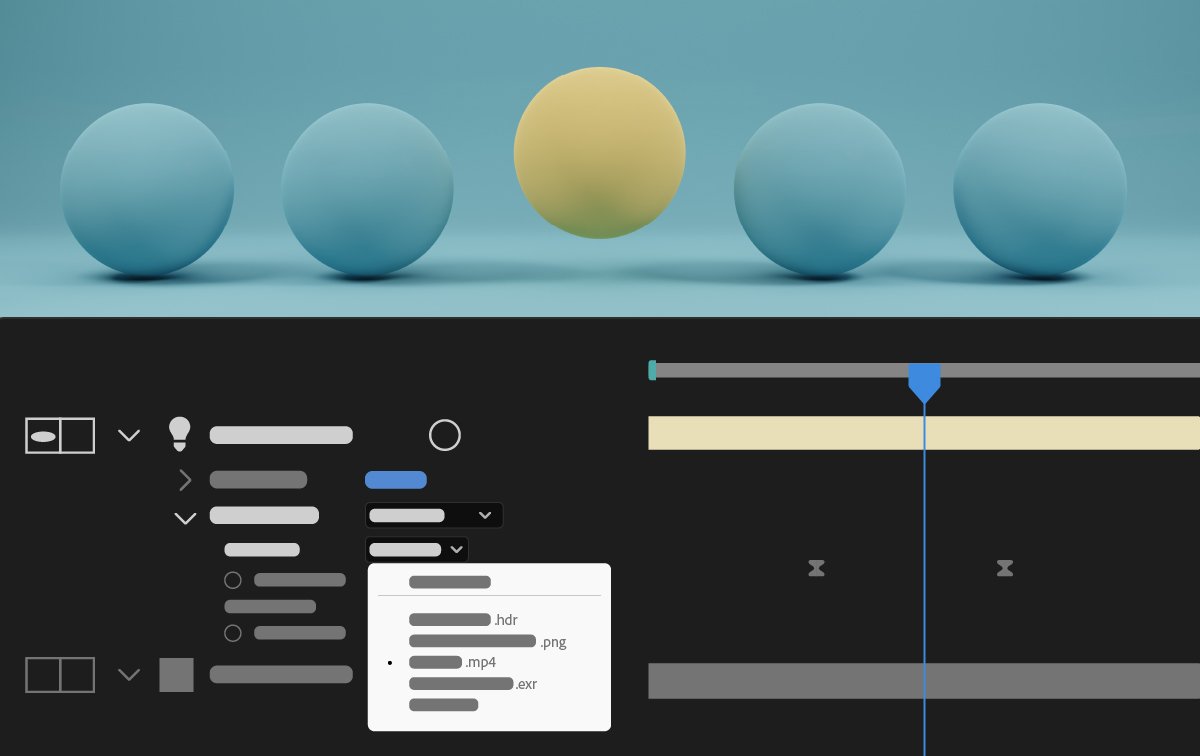
Animated Environment Lights
Illuminate your Advanced 3D compositions by choosing a composition, video, or image layer as an Environment light source.

Helper commands for common 3D workflows
Use new commands to simplify common 3D workflows with single-click actions, such as linking a camera to a light, applying 2D effects to 3D objects, and visualizing the Environment Light's source.

Customize Transparency Grids
Use a new set of options in Grids & Guides preferences to change the size and colors of the transparency grids displayed behind the composition contents.

Customize panel background colors
Personalize the empty fallow area around your composition by selecting a background color from five grey brightness levels or choosing a custom color.
Learn to personalize the empty space around your composition >

Maintain your workspace when opening projects
Keep your current workspace layout consistent when opening projects saved with different workspaces in After Effects.

New and improved Null creation commands
Effortlessly create Null controllers for positional properties such as the gradient points of Shapes, Puppet Pins, and effect points, simplifying your workflow and enhancing efficiency.
Join our community to connect, learn, and engage

Create stunning 3D animations in After Effects
Animate characters and illustrations, add motion to text, and more.
