Keep agreements moving with automatic follow-ups that reduce missed actions and the need for manual intervention.
Adobe Acrobat Sign allows administrators to configure automatic reminders for recipients who have not completed their required actions. Default reminders reduce the need for senders to configure follow-up notifications individually and help maintain consistent communication across agreements.
Administrators can establish account- or group-level reminder frequencies, control whether senders can modify reminders, and manage related notification and reporting behavior. Agreements can also use reminder frequencies defined through the Workflow Designer.
Agreement reminder configuration
Availability
- Business and Enterprise: Default reminder automation and sender modification controls are available.
- Commercial, Government, and Sandbox: Workflow-defined reminders are available to accounts with access to the Workflow Designer.
Configuration scope
- Account: Administrators can establish default reminder frequencies and sender permissions.
- Group: Administrators can override inherited account settings to establish different reminder behavior.
- Support-managed: Enterprise accounts can request reminder email suppression through Adobe Support.
Default value
- Allow senders to set reminders on the send page: Enabled by default for newly provisioned accounts. Senders can configure reminders when preparing agreements.
- Set a default reminder for agreements created by users in this account: Disabled by default. Agreements don't automatically receive an account-level reminder frequency until an administrator enables this setting.
- Workflow Designer: The default selection is Use admin defined frequency, which applies the account/group default when one is configured. This applies to new and existing workflows.
In-flight impact
- Account and Group: Changes to default reminder frequencies apply only to agreements sent after the change. Existing agreements retain their original frequency unless the sender explicitly modifies the reminder.
- Workflow Designer: Changes to workflow-defined frequencies affect only subsequently sent agreements. Existing agreements retain their original reminder frequency.
Access the reminder configuration controls
Go to Account Settings > Send Settings > Reminders.

Reminder configuration options
Allow senders to set reminders on the send page
Controls whether senders can configure reminders while preparing an agreement.
| Setting | Effect on senders |
|---|---|
| Enabled | Senders can configure reminders during agreement preparation. |
| Disabled | Senders cannot configure reminders during agreement preparation when default reminders are enforced. Automatically configured reminders still apply. |
Disabling sender modifications is useful when an organization requires consistent reminder behavior. Enabling modifications gives senders flexibility to accommodate agreements requiring different follow-up frequencies.
This permission also governs sender modifications on the custom Compose page. It does not prevent reminders predefined in the Workflow Designer from applying.
Set a default reminder for agreements created by users in this account
Defines the recurring reminder frequency automatically applied when an agreement has no explicitly configured reminder frequency.
Use this setting when your organization wants consistent follow-up notifications without relying on individual senders to establish reminders.
When enabled, the Send a reminder every selector becomes available, allowing administrators to choose the default frequency. The Note field can be used to include additional text in the reminder.
A group-level default can provide a different frequency from the account default. Agreements created through workflows can also use explicitly configured frequencies that override these defaults.
How senders use reminders
Senders can configure reminders while composing agreements, subject to administrator permissions.
After an agreement is sent, the Manage page provides options to add, review, edit, and cancel reminders associated with that agreement.
For instructions, see Set and manage agreement reminders.
How Workflow Designer reminders interact with defaults
Reminder frequencies explicitly configured in the Workflow Designer take precedence over account/group defaults.
| Workflow reminder setting | Agreement behavior |
|---|---|
| Use admin defined frequency | Uses the applicable account or group default. |
| None | Disables recurring reminders for agreements sent through the workflow. |
| Specific frequency | Applies the workflow-defined frequency instead of the account/group default. |
Senders can adjust the workflow-defined frequency for an individual agreement when administrator permissions allow it. These adjustments do not change the workflow.
Workflow-level reminders require the modern Workflow Designer and modern custom Compose page. They are not supported through the classic experience.
For instructions, see Create a custom Compose page using the Workflow Designer.
Additional administrator considerations
Include reminder events in audit reports
Administrators can include reminder email events in agreement audit reports to maintain a record of follow-up communications.
To enable reminder reporting, go to Account Settings > Global Settings > Audit Report and enable Include reminders in audit report.
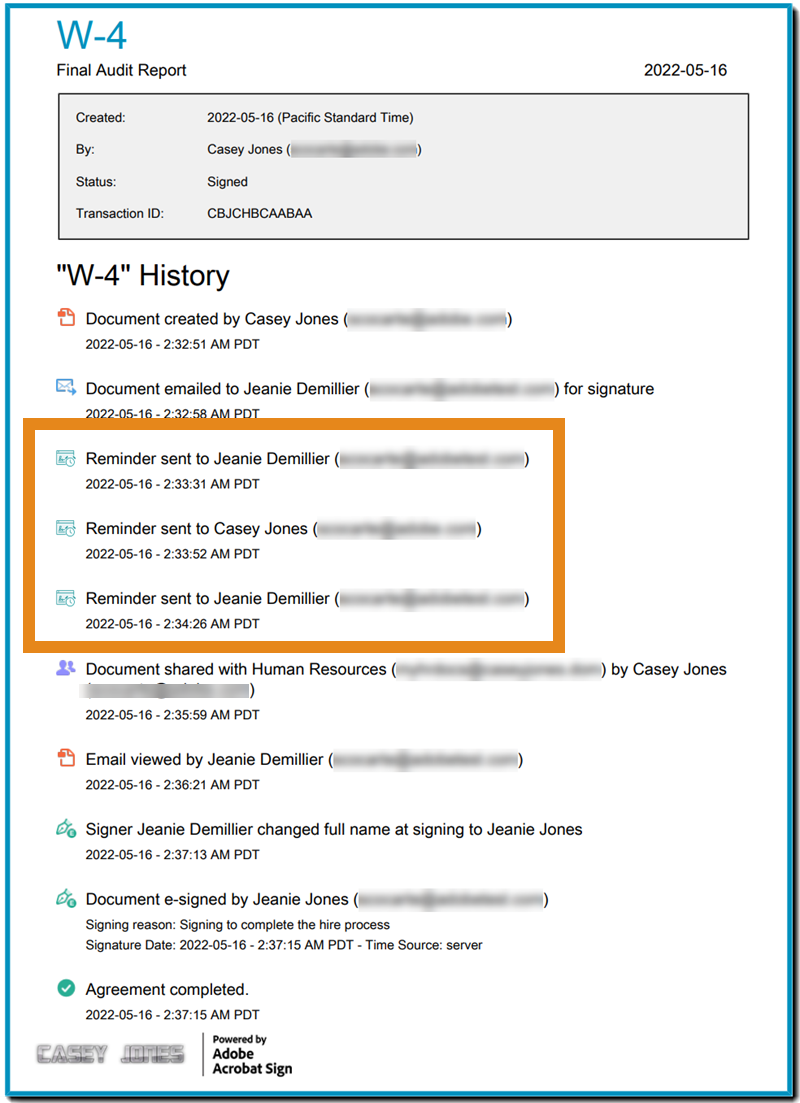
When enabled, the audit report records reminder emails sent to recipients, up to a maximum of 250 reminder events per agreement.
When reminder email delivery is suppressed, the associated reminder events are not recorded in the agreement activity log or audit report. This remains true even when webhook notifications are generated.
Administrators who rely on audit reports to verify follow-up communications should consider the effect of email suppression before enabling it.
Customize reminder email templates
Enterprise customers can use custom email templates to modify the content of reminder emails delivered through Acrobat Sign.
Custom templates allow organizations to align reminder communications with their branding and messaging requirements.
Email template customization does not change the reminder frequency or sender permissions. When reminder email delivery is suppressed, customized reminder emails are not delivered.
For configuration details, see Use customized email templates.
Suppress reminder email delivery
By default, Acrobat Sign sends reminder emails according to the configured reminder frequency.
Enterprise customers can request suppression of reminder email delivery at the account or group level through Adobe Acrobat Sign Support.
This option is useful when an organization manages reminder communications through another system, such as a centralized email service.
When email delivery is suppressed:
- Acrobat Sign does not send reminder emails.
- Reminder-triggered webhook notifications can still be generated.
- Suppressed reminder events are not recorded in agreement activity logs or audit reports.
Email suppression does not change the configured reminder frequency. It changes how reminder notifications are delivered and recorded.
Webhook events generated by reminders
Reminder webhooks allow external applications to identify reminder activity and respond through automated processes.
The event generated depends on whether Acrobat Sign sends the reminder email or suppresses its delivery.
| Reminder behavior | Individual agreement | Send in Bulk |
|---|---|---|
| Reminder email delivered | AGREEMENT_REMINDER_SENT | MEGASIGN_REMINDER_SENT |
| Reminder email suppressed | AGREEMENT_REMINDER_INITIATED | MEGASIGN_REMINDER_INITIATED |
For Send in Bulk, reminder webhook events are generated once for the parent template, not separately for each child agreement.
Organizations using external notification systems can use these events to identify reminder activity even when Acrobat Sign does not deliver reminder emails.
For details about event subscriptions and webhook configuration, see Acrobat Sign Webhook overview.
Reminders and the REST API
The Acrobat Sign REST v6 API supports creating, retrieving, and updating reminders associated with individual agreements.
| Operation | Endpoint | Purpose |
|---|---|---|
| POST | /agreements/{agreementId}/reminders | Create reminders for specified agreement participants. |
| GET | /agreements/{agreementId}/reminders | Retrieve reminders associated with an agreement. |
| GET | /agreements/{agreementId}/reminders/{reminderId} | Retrieve a specific reminder. |
| PUT | /agreements/{agreementId}/reminders/{reminderId} | Update an existing reminder. |
These operations allow organizations to manage agreement reminders programmatically without requiring senders to configure each reminder manually.
For request parameters, response structures, and implementation details, see the Acrobat Sign REST API documentation.
Things to know
- Reminders stop when the required participant action is completed or the agreement reaches a terminal state.
- Recipients can cancel reminders using the cancellation option provided in reminder emails.
- Existing agreements retain their reminder frequencies when administrators change account/group defaults or workflow-defined reminder settings.
- Disabling Allow senders to set reminders on the send page prevents sender adjustments during agreement preparation but does not disable automatically configured reminders.

Streamline your work with Acrobat Sign
Manage and sign documents online quickly and easily.
