
Sign in to Knowledge Base in Acrobat as an administrator.
Last updated on
Sep 23, 2026
Review the connectors configured across your organization.
The Connectors tab gives administrators an organization-wide view of connector assignments, owners, source items, and status. Administrators can search, refresh, and export the data, but they cannot change connector configurations from this view.
Open the Connectors view
Select Assets from the navigation menu.
Select the Connectors tab.
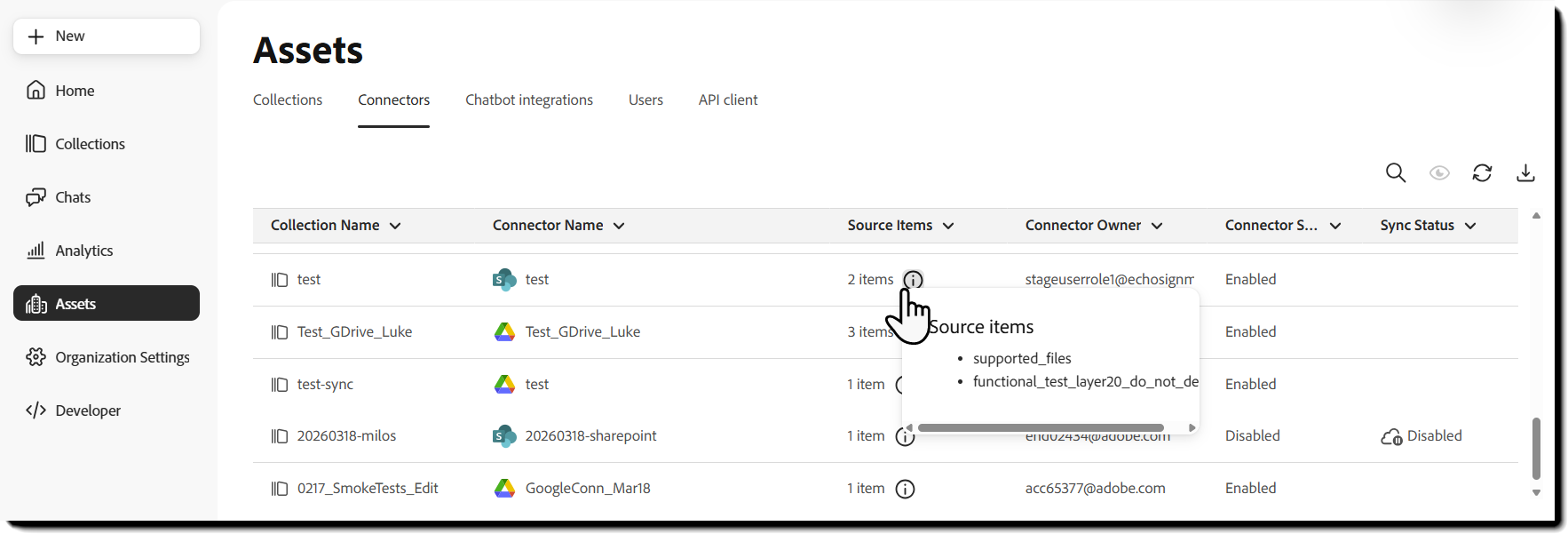
What the table shows
The table includes the following columns:
- Collection name: Name of the collection associated with the connector.
- Connector name: Name entered when the connector was configured.
- Source Items: Number of source items associated with the connector.
- Connector owner: Email address of the user who created the connector.
- Connector status: Indicates whether the connector is enabled or disabled.
- Sync status: Displays Disabled when synchronization is disabled. Otherwise, no status is displayed.
Connector status reflects whether the connector is enabled. Sync status indicates only whether synchronization is disabled.
Available controls
Three available controls appear above the table.
Search
Select the search icon and enter a value to search the Connector Name values.
The table updates to show matching connectors.
Show or hide columns
Select the column-visibility icon to choose which columns appear in the table.
Refresh
Select the refresh icon to retrieve the latest connector information.
Download
Select the download icon to export the available connector data as a CSV file.
Things to know
- You must be an administrator to access the Connectors tab.
- You cannot edit, delete, enable, disable, or synchronize connectors from this view.
- Users manage individual connectors from the Collections page.
- A blank Sync status cell does not provide additional synchronization details.
